
How points work
Updated Last verified against the product
In short
Velarya points are the loyalty balance patients build at your practice. Patients earn them for what you choose to reward, such as paid treatments, check-ins, referrals, signing up and birthdays. They redeem points in the patient app at 100 points to $1.00 of wallet credit and spend it when they book or buy.
- Who can do this
- Admins and roles with Rewards & loyalty program set to Edit change the Earning Rule
- Applies to
- Your whole practice, every location
- Plans
- Basic, Scale, Branded and Connected
- Time
- 5 minute read
What are Velarya points?
Velarya points, also called loyalty or reward points, are the balance each patient builds at your practice, worth $0.01 of wallet credit apiece. You choose what earns them, and patients turn them into wallet credit in the patient app.
Points and wallet credit are two balances that work together:
- Points are what a patient collects. 100 points are worth $1.00, and the app shows that dollar amount as the balance’s rewards value.
- Wallet credit is money the patient spends with you. Redeemed points are one way it fills up; sign-up bonuses, membership credits and your team add to it too.
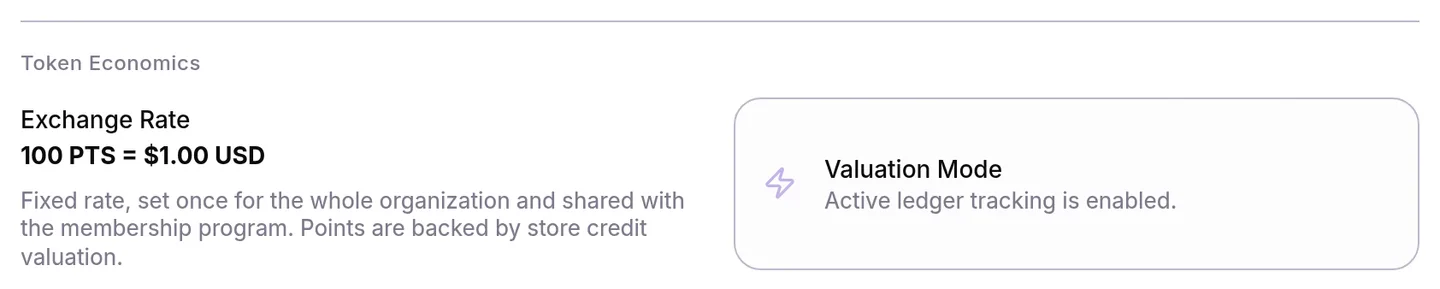
Because a point is worth $0.01, your Earning Rule doubles as the percentage patients get back: 5 points per $1 gives 5% back in credit. The Rewards Program page in Organization settings shows the value of a point under Token Economics as the Exchange Rate: 100 PTS = $1.00.
How do patients earn points?
Patients collect Velarya points in seven ways, and every award lands in the same balance.
| Way to earn | When the points arrive | Where you set it |
|---|---|---|
| Paying for treatments | Once per sale, when the sale is paid in full: in the app, by payment link, or at your front desk by any method, including a New Transaction sale | Earning Rule in Rewards Program; a member earns at their plan’s Member points earning rate when it is higher |
| Joining your practice in the app | The moment they join, once, when the bonus is points | Sign-Up Bonus in Rewards Program |
| Joining a membership | Once, the moment the membership starts, when the plan’s join bonus is points | Membership Join Bonus on the plan in Memberships |
| Their birthday | On their birthday, once a year, when the gift is points and they are in your Eligible audience, use the patient app and have a date of birth on file | Birthday Gift in Rewards Program |
| Checking in | When your team checks them in at the front desk, by scanning the QR code in their app or on the Front Desk board | The Check-In challenge in Challenges |
| Referring a friend, or joining with a friend’s code | When the friend joins with the code, or meets your activation rule, such as paying for a treatment. With Approve referrals set to Manually, the points arrive when your team approves the referral. Each side gets the reward you set for it, when that reward is points | The Refer a Friend challenge in Challenges |
| Your team adding points | When a staff member adds points on their profile | Adjust next to Rewards in Clients |
Velarya adds up what the treatments in a sale cost, add-ons included, after any member price or discount. New Transaction shows each treatment at the patient’s member or birthday price when one applies, with the regular price struck through. Velarya multiplies that total by the patient’s rate and rounds down once to a whole point. An $89.99 facial at 5 points per $1 earns 449 points, and two in one sale earn 899. Each sale earns once. If you refund a sale, Velarya takes back the points the refunded amount earned.
To set the Earning Rule and a sign-up bonus, see Set up points earning. For the other ways to earn, see Set up a birthday gift, Set up check-in rewards, Set up referral rewards and Create a membership plan.
How do points become wallet credit?
Patients redeem Velarya points for wallet credit themselves in the patient app, at 100 points to $1.00, with no staff action. In the app, the patient:
- Selects Redeem on the points card on Home, or next to their points on the Rewards tab. The Redeem Points sheet opens.
- Enters a whole number in Points to redeem. The rewards value under the field updates with each digit.
- Selects Confirm. The credit is in their wallet at once, and Points Redeemed! confirms how many points they redeemed.
A patient can redeem up to their whole balance; entering more points than they hold shows “Insufficient points balance”.
How is wallet credit spent?
Wallet credit in Velarya pays for bookings and purchases at your practice, in the app or at your front desk.
- Booking in the app. At checkout, the payment options show Wallet Balance with the switch Use my wallet balance towards this purchase. With it on, the summary shows Wallet Credit and what is Due Now, and the card pays the rest. When the credit covers the whole total, the payment method reads Wallet balance.
- Joining a membership in the app. Wallet credit counts toward the first payment, as How memberships work shows.
- At your front desk. Your team applies credit from the patient’s wallet when they check the patient out from the Calendar, the Front Desk or a transaction, or in Transactions > New Transaction with Use Credits ($) under Payment & Totals. Velarya takes it from the wallet when the sale is paid, and the transaction shows it as Credits applied. Redeem a voucher at checkout walks through both.

When a patient pays with credit, Velarya spends the credit your practice gave them first, such as redeemed points, bonuses and membership credit. Credit the patient paid for goes last.
Here is one patient’s first two visits at an Earning Rule of 5 points per $1, with a 250-point sign-up bonus and a 50-point check-in challenge:
| What happens | Points | Points balance | Wallet |
|---|---|---|---|
| Joins your practice in the app | +250 | 250 | $0.00 |
| Checks in at the front desk for a facial | +50 | 300 | $0.00 |
| Pays $189.00 for the facial | +945 | 1,245 | $0.00 |
| Redeems 1,200 points | -1,200 | 45 | $12.00 |
| Books a $120.00 peel, uses the $12.00 credit and pays $108.00 by card | +600 | 645 | $0.00 |
What do patients see?
Patients see their Velarya points and wallet credit on the Home and Rewards tabs of the patient app, and every change in Activity. The patient app is your own app on the Branded and Connected plans, or the Velarya app.
- Home shows a points card with the balance, such as 1,245 Points, its rewards value in dollars, View Activity, and Redeem when they have points.
- The Rewards tab shows a wallet card with their Available balance and View Activity, then their points, with Redeem when they have points. The Challenges they can take part in follow.
- Activity lists everything, with the filters All, Points & Rewards and Transactions. Points rows read like +945 pts; wallet rows read like +$12.00.
- A notification arrives when they earn points for a visit, a check-in, a referral, the sign-up bonus or their birthday, and when they redeem points, as Loyalty notifications patients receive lists.
- Before they book, the booking summary shows the Points Earned for the visit at their rate, and the appointment and its receipt show the points it earned.
What you can change
Velarya points are set once for your whole practice: in Organization settings > Rewards Program, in Challenges, and on each membership plan in Memberships.
| Setting | Options and limits | Default | What it does |
|---|---|---|---|
| Earning Rule (Rewards Program) | A whole number from 0 to 100 points per $1 | 0 | Points per $1 patients spend on treatments |
| Member points earning rate (each plan in Memberships) | Points per $1; a rate below the Earning Rule saves as the Earning Rule | Your Earning Rule | A member’s points per $1 on treatments |
| Membership Join Bonus (each plan in Memberships) | Points, a discount or a free service | Off | A one-time gift when a patient joins the plan |
| Sign-Up Bonus (Rewards Program) | Points up to 9,999, Credits up to $9,999, or Voucher | Off | A one-time gift when a patient joins in the app |
| Birthday Gift (Rewards Program) | A discount, a free service or points | Off | A gift on each eligible patient’s birthday |
| Check-In and Refer a Friend (Challenges) | Points per check-in; points or a free service per referral | Off | Rewards for checking in and for referring a friend |
Where to find patients’ points and credit
Your team sees each patient’s Velarya points and wallet credit on their profile in Clients: Wallet shows the credit and Rewards shows the points. Seeing them takes Wallet, points & credits at View or above; Loyalty roles and permissions lists which roles have it.
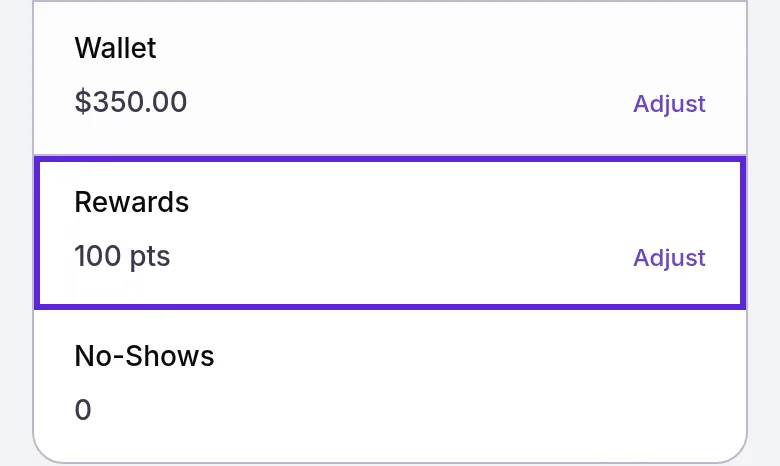
The same balances appear as Wallet and points chips on a transaction, and the appointment drawer shows the patient’s wallet balance when they have credit. The Point Ledger at the bottom of Organization settings > Rewards Program lists the point awards, adjustments and redemptions at the location you are working in, or another you choose in its location menu, plus the practice-wide ones, as Set up points earning describes. It shows patient names as your role’s Client name visibility allows. Seeing it takes Rewards & loyalty program at View, which Admins and Location Managers have by default.
To add or remove points or credit for one patient, see Adjust a patient’s points or wallet credit.
Frequently asked questions
Was this guide helpful?
Last verified
What changed
- : Referral points arrive when the friend joins or meets your activation rule, and, when you approve referrals manually, once your team approves the referral.
- : New Transaction shows each treatment at the patient's member or birthday price, with the regular price struck through. The Point Ledger note covers its location menu and name visibility.