
Set up points earning
Updated Last verified against the product
In short
To set up points earning in Velarya, open Organization settings > Rewards Program, enter the points patients earn per $1 in Earning Rule, and select Save. 100 points are worth $1.00 of wallet credit, so an Earning Rule of 5 gives patients 5% back on every paid treatment.
- Who can do this
- Admins and roles with Rewards & loyalty program set to Edit
- Applies to
- Your whole practice, every location
- Plans
- Basic, Scale, Branded and Connected
- Time
- 5 minutes
Before you begin
- Your treatments have prices in Organization settings > Service Catalog, because points are counted on what a patient pays for them.
Open the Rewards Program settings
The Rewards Program page in Organization settings holds the Earning Rule and the Sign-Up Bonus for your whole practice, and the Point Ledger of the points your patients earn and spend.
- Open the menu at the bottom of the left sidebar and select Organization settings.
- Under Client Experience, select Rewards Program.
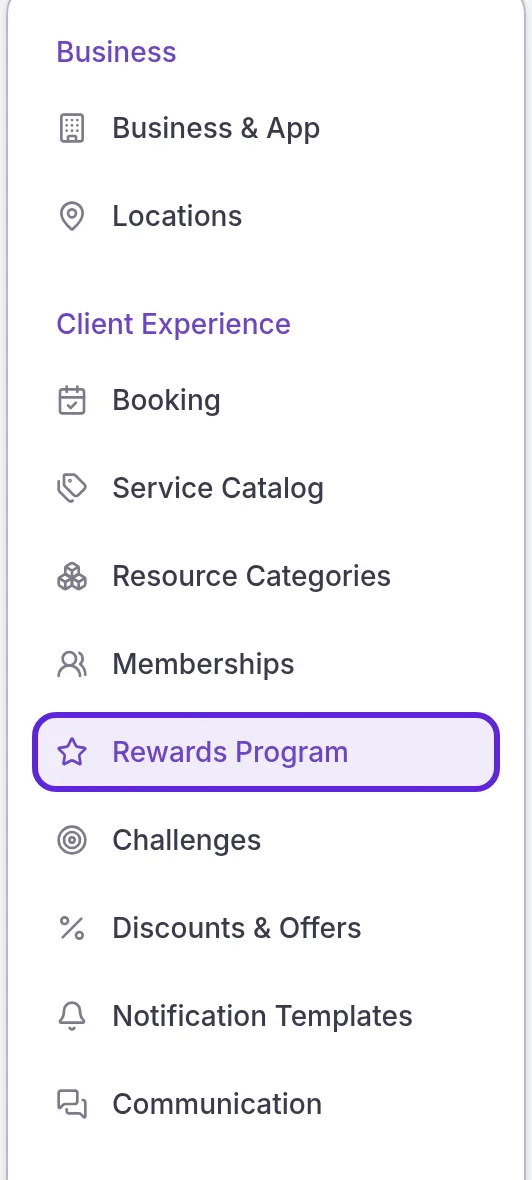
The settings on the page apply to your whole practice, across every location.
Set how many points patients earn per $1
The Earning Rule is the number of points a patient earns for every $1.00 they spend on treatments. It starts at 0, so patients earn points on spending once you set it.
- Enter a whole number from 0 to 100 in Earning Rule, under Earning Mechanics.
- Select Save in the Unsaved changes bar at the top of the page. The bar closes, and the new rate applies to every point award from then on.

The Unsaved changes bar appears at the top of the page as soon as you change a field.

Because 100 points are worth $1.00 of wallet credit, the Earning Rule is also the percentage a patient gets back.
| Earning Rule | A $200 treatment earns | Worth in wallet credit |
|---|---|---|
| 3 points per $1 | 600 points | $6.00 (3% back) |
| 5 points per $1 | 1,000 points | $10.00 (5% back) |
| 10 points per $1 | 2,000 points | $20.00 (10% back) |
Give new patients a sign-up bonus
A sign-up bonus is a one-time gift of points, wallet credit or a service voucher that Velarya gives each patient who joins your practice in the patient app: your own app on the Branded and Connected plans, or the Velarya app.
- Turn on the Sign-Up Bonus switch. The bonus options appear below it.
- Choose Points, Credits or Voucher.
- Enter the bonus:
- Points: up to 9,999 points, added to the patient’s balance.
- Credits: a dollar amount up to $9,999, added to the patient’s wallet.
- Voucher: a service of your choice, which the patient gets a voucher for.
- Select Save at the top of the page. The Unsaved changes bar closes, and every patient who joins from then on receives the bonus.
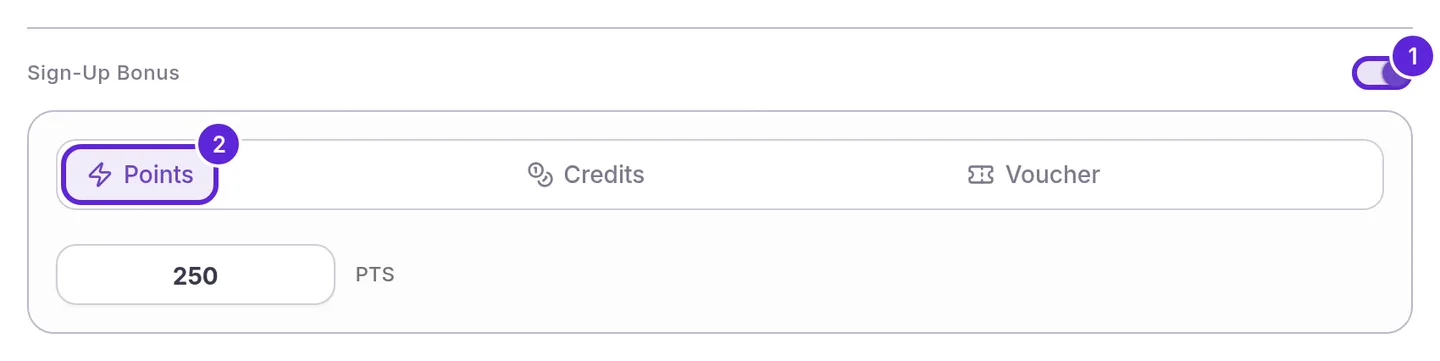
The bonus arrives the moment a patient joins, and each patient receives it once. To give each patient a gift on their birthday as well, see Set up a birthday gift.
What do patients see?
Patients see their points balance on the Home and Rewards tabs of the patient app, as a number of points with its rewards value in dollars underneath. They choose Redeem to turn points into wallet credit at 100 points to $1.00, and use the credit when they pay for their next visit. View Activity lists every point they have earned and redeemed.
For the whole program from the patient’s side, see Med spa loyalty program software.
How are points counted?
Velarya awards points once per sale, when it is paid in full, however the patient pays: in the patient app, through a payment link, or at your front desk by card, card reader, saved card or cash.
| Situation | What Velarya does |
|---|---|
| A patient pays for a $149.50 treatment at 5 points per $1 | Awards 747 points: $149.50 × 5, rounded down to a whole point |
| An order holds two treatments | Counts both treatments’ prices together |
| A voucher or a membership covers the whole treatment | Counts the $0 the patient paid, so awards no points for that line |
| The patient is a member | Uses their plan’s Member points earning rate, or the Earning Rule if that is higher |
| You ring up a treatment in Transactions with no appointment | Awards points as soon as the sale is paid |
| The patient pays a booking deposit | Awards the points when the balance is paid, on the full treatment price |
| The same sale is confirmed twice, or the visit moves between columns on the Front Desk | Awards the points once |
| The order is refunded | Takes back the points the refunded amount earned |
The Point Ledger at the bottom of the page lists point awards, adjustments and redemptions newest first, under Time, Client, Action and Points. It opens on the location you are working in. When you work at more than one location, a location menu next to its heading switches to another one, and admins can choose All locations. Each row belongs to the location where it happened: the sale’s location for points earned on a purchase, the check-in’s location, or the location a staff member was working in when they adjusted points. Sign-up bonuses, birthday gifts, referral rewards and points patients redeem in the app belong to the whole practice and appear under every location. Patient names follow your role’s Client name visibility, as they do in Clients. Select a patient’s name to open their profile, or the action to open the order behind an award.
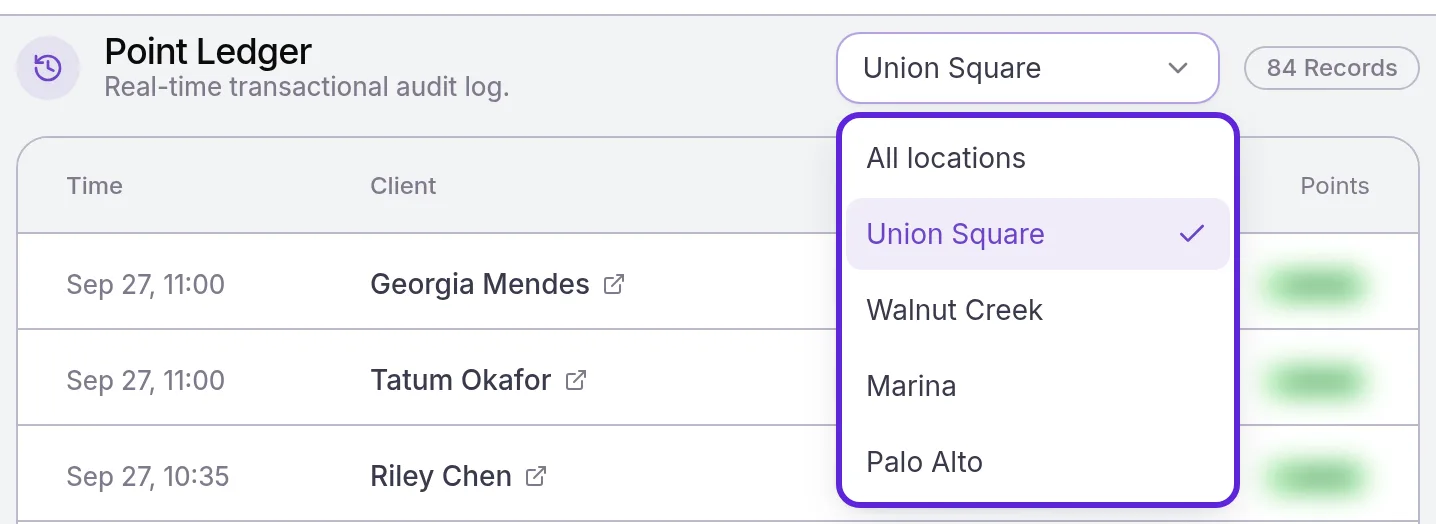
To correct a patient’s balance, open them in Clients, select Adjust next to Rewards, and choose Manually Add Reward Points or Manually Redeem Points.
If something goes wrong
The Earning Rule shows “Must be a whole number”. Points per $1 are whole numbers only. Enter a whole number such as 5.
The Earning Rule shows “Must be 100 points per $1 or less”. The highest rate is 100 points per $1, which is 100% back.
A patient’s points didn’t appear after a visit. Check that the Earning Rule is above 0. Then open the sale in Transactions and check that it is paid, that it belongs to that patient, and that the patient paid something for a treatment on it.
Rewards Program isn’t in my Organization settings menu. The page needs the Rewards & loyalty program permission: View to see the settings, Edit to change them. Ask an Admin to update your role; see Loyalty roles and permissions.
A new patient didn’t get the sign-up bonus. Check that the Sign-Up Bonus switch is on and the bonus has a value. A bonus of 0 points or $0 sends nothing, and a Voucher bonus needs a service chosen. Patients who joined in the app before you turned the bonus on do not receive it.
Frequently asked questions
Was this guide helpful?
Last verified
What changed
- : The Point Ledger section and FAQ describe its location menu, which appears when you work at more than one location, and patient names that follow each role's Client name visibility. New Point Ledger screenshot.