
How memberships work
Updated Last verified against the product
In short
A Velarya membership is a paid plan that charges a patient's card every billing period and gives them the plan's wallet credit, treatment vouchers, member pricing and points rate. Patients join in your app or staff assign a plan from the patient's profile, and staff change or cancel it from the Club Membership card.
- Who can do this
- Admins and roles with Member lifecycle (pause/resume/cancel/change-tier) set to Manage change a patient's membership
- Applies to
- Your whole practice, every location
- Plans
- Basic, Scale, Branded and Connected
- Time
- 6 minute read
What is a membership?
A membership in Velarya is a paid plan that charges a patient automatically every billing period and gives them wallet credit, treatment vouchers, member pricing and a points rate at least as high as your Earning Rule. You build each plan once for your whole practice, as described in Create a membership plan, and each location chooses which plans it sells. Patients join in your app, or your team assigns them a plan from their profile, and Velarya runs the billing and the benefits from there. Memberships are available on every plan.
How does a patient join?
A patient joins a Velarya membership in your app, or your team assigns a plan from the patient’s profile in Clients. Either way, the membership starts once the first payment goes through.
- In the app, the patient picks a plan under Memberships, selects Become a Member and pays by card. The checkout’s Bill Summary shows the price, any Setup Fee, any Wallet credit they use and the Amount due today, and the app confirms with Membership Activated!
- From the patient’s profile, staff assign a plan from the Club Membership card. With more than one location, they also choose the Purchase Branch, the location the membership belongs to. For a paid plan, Velarya creates a payment link for staff to send, and the membership starts when the patient pays it by card. A plan with no charge starts at once.
When a membership starts, Velarya adds the plan’s first credit and vouchers and its join bonus, and sends the patient a welcome message.
How does membership billing work?
Velarya charges each member’s saved card at the start of every billing period, at the price they joined at, into your practice’s own payment account, as How payments work in Velarya explains.
| When | What Velarya does |
|---|---|
| About 3 days before a renewal | Sends a renewal reminder to each member whose plan will renew, while Appointment Reminders is on in Notification Templates (the default) |
| Renewal day | Charges the saved card and starts the new billing period with its credit and vouchers |
| A renewal payment fails | Asks the member to update their card, keeps their benefits active, and tries again 3 days later |
| Day 7 after the first failure | Tries a last time; if that fails, cancels the membership and tells the member and your practice |
| You change the plan’s price | Sends each affected member a notice. A lower price applies from their next renewal; after a rise, members keep their current price until the option you chose moves them |
For example, a renewal due on October 1 that fails is retried on October 4 and October 8. If the October 8 attempt also fails, the membership ends that day and the member’s unused membership credit stays in their wallet.
What do members get each cycle?
Each cycle, a Velarya membership adds the credit and vouchers the plan’s components set, and member pricing applies every time the member pays.
| Benefit | How the member receives it |
|---|---|
| Credit | Added to their wallet each cycle. Unused credit carries over, and the member spends it when they pay in the app or at your front desk |
| A voucher for one service | Arrives on its own at the start of each cycle and lasts until the end of that billing period |
| A voucher with a choice of services | The member picks their treatment on Claim your benefits in the app before the Voucher selection deadline; staff can also pick for them on their profile |
| Member pricing | Applied automatically when the member pays, in the app and at your front desk |
| Points | Earned at the plan’s Member points earning rate or your Earning Rule, whichever is higher |
| A birthday discount | Compared with the member price on each service; the member pays the lower of the two |
| A discount code | Comes off the member price when the code combines with Member pricing; otherwise the member pays whichever is lower |
At front desk checkout, a treatment the member holds a voucher for shows Voucher available, and staff whose role holds Discounts at checkout set to Override can switch a visit to non-member pricing, or to another plan’s pricing, in the Pricing row. In New Transaction, each line shows what the member pays, their member price or a lower birthday price, with the regular price struck through, and the Total due is exactly what the sale records. Redeem a voucher at checkout covers the voucher side, How discounts combine shows how a code works with member pricing, and How points work explains how every visit’s points are counted.
How do plan changes work?
A Velarya member moves to another plan with a plan change: staff use Modify plan on the Club Membership card, and members use Upgrade/Downgrade membership in the app. Velarya compares monthly prices to tell an upgrade from a downgrade, using the price this member pays today and counting a quarterly price as a third per month and an annual price as a twelfth. Before staff confirm, the dialog shows when the change starts and exactly what is charged.
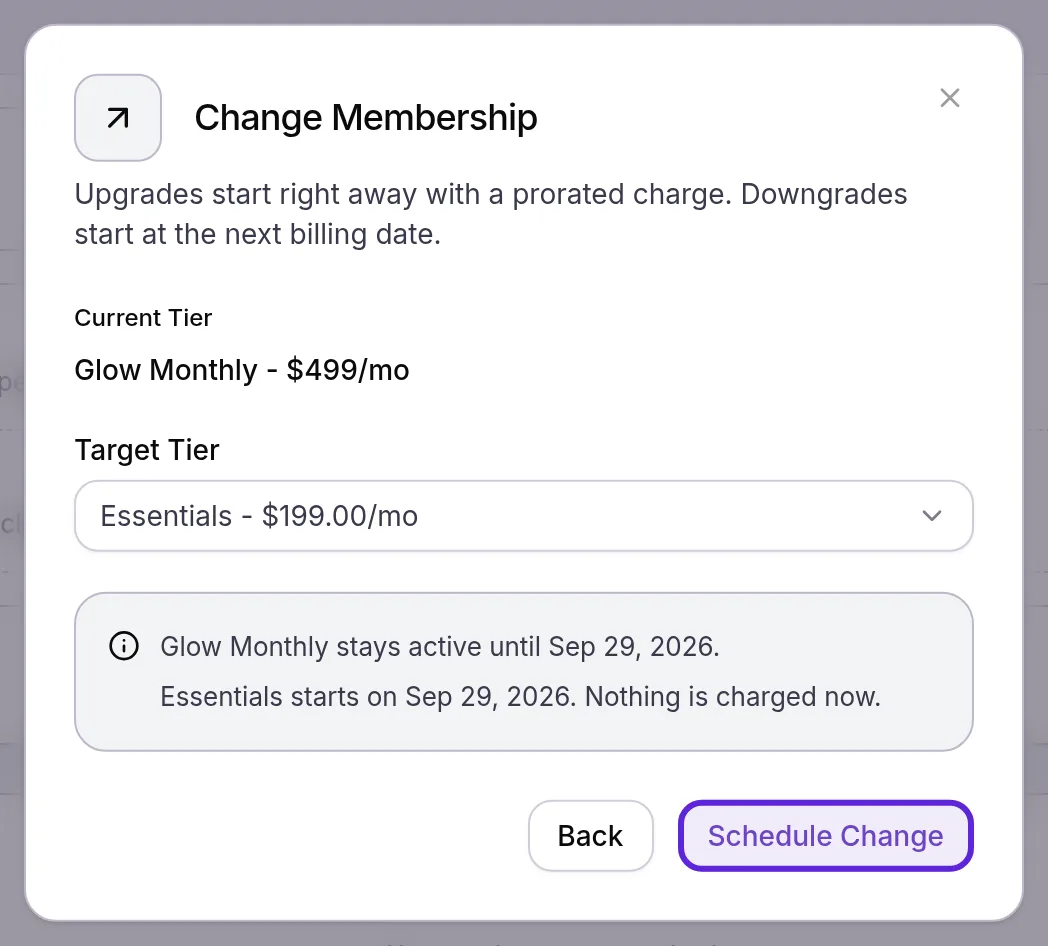
- An upgrade (a plan that costs more per month) starts at once, and the card on file pays for the rest of the current billing period. The new plan’s credit and vouchers replace the old plan’s unused credit.
- A downgrade, or a plan at the same monthly price, starts on the next billing date, with nothing charged now.
Here is what each change costs a member halfway through a 30-day billing period.
| Change | When it starts | Charged now |
|---|---|---|
| $199 monthly plan to a $499 monthly plan | At once; the billing date stays the same | $150.00, half of the $300.00 difference |
| $499 monthly plan to a $199 monthly plan | The next billing date | $0.00 |
| $199 monthly plan to a $3,990 annual plan | At once, with a new yearly billing period from today | $3,890.50: $3,990.00 less the unused $99.50 of the month |
| $499 monthly plan to a $3,990 annual plan | The next billing date, because $3,990 a year is $332.50 a month | $0.00 |
Charges are rounded to the cent, and any service fee you pass on to patients is added. An upgrade that works out under $0.50 starts with nothing charged.
When a member moves from a plan they prepaid, such as annual, to one billed more often, and the unused part of what they prepaid is worth more than the new plan’s first charge, Velarya adds the difference to their Wallet Credit. The dialog, or Checkout in the app, shows that amount before the change is confirmed.
How does cancelling a membership work?
Staff cancel a Velarya membership from the Club Membership card, and members cancel their own in the app while your Cancellation method allows it.
| Action | Who can do it | What happens |
|---|---|---|
| Cancel at period end | Staff, or the member in the app | Benefits continue until the renewal date, then the membership ends with no further charges |
| Cancel immediately | Staff, on a monthly or quarterly plan | Access and benefits end now, and Velarya removes the plan’s unused credit; staff can refund up to the unused part of the current billing period |
| Undo cancellation | Staff, before the period ends | Clears a scheduled cancellation, and the membership renews as normal |
| Pause | Staff, on a plan with Allow Pausing on | Stops billing and new benefits for up to the plan’s Max Duration (Months), at most Limit per year times a year, then resumes on its own; staff can resume it early |
Cancelling inside a plan’s commitment charges its early cancellation penalty to the card on file, and staff can waive it when they cancel. Cancelling an annual plan turns off auto-renewal, and the member keeps their benefits until the paid year ends.
What do patients see?
Members manage their Velarya membership in the patient app, under Memberships in the app menu. Their plan sits under Manage my membership with an Active badge and its renewal date, and other plans sit under Browse other memberships. Their plan’s Manage membership tab shows the terms, Billing history, Upgrade/Downgrade membership and Cancel membership.
When this cycle’s vouchers are waiting, the Home tab shows Your free vouchers are here! with a Claim button, which opens Claim your benefits. Patients who are not members yet see Unlock member perks! with See Memberships on Home.
A paused membership shows as paused in the app, with the date it resumes.
With Call to cancel chosen, members see “Please contact the clinic to cancel your membership.” instead of the cancel button. Members also get a welcome message, a reminder before each renewal and a notice if a payment fails, each listed in Loyalty notifications patients receive.
What you can change
The Global membership settings at the top of Organization settings > Memberships apply to every plan. Admins and roles with Membership plan definitions set to Edit change them.
| Setting | Default | What it does |
|---|---|---|
| Cancellation method | Cancel in app (members can self-cancel) | Call to cancel (hide the in-app button) replaces the member’s cancel button with a request to contact your practice; staff can always cancel |
| Voucher selection deadline | End of cycle | Members choose until the end of each cycle; Custom day sets a Deadline day (1-28), the number of days from the start of each cycle |
| If a choice voucher is not selected | Forfeit | Forfeit lets unpicked choices lapse at the deadline; Auto-select first option issues the first services on the list; Convert to credit adds wallet credit worth the cheapest option |
| Cross-location voucher redemption | On | On, members redeem membership vouchers at every location; off, only at the location where they joined. The switch saves at once |
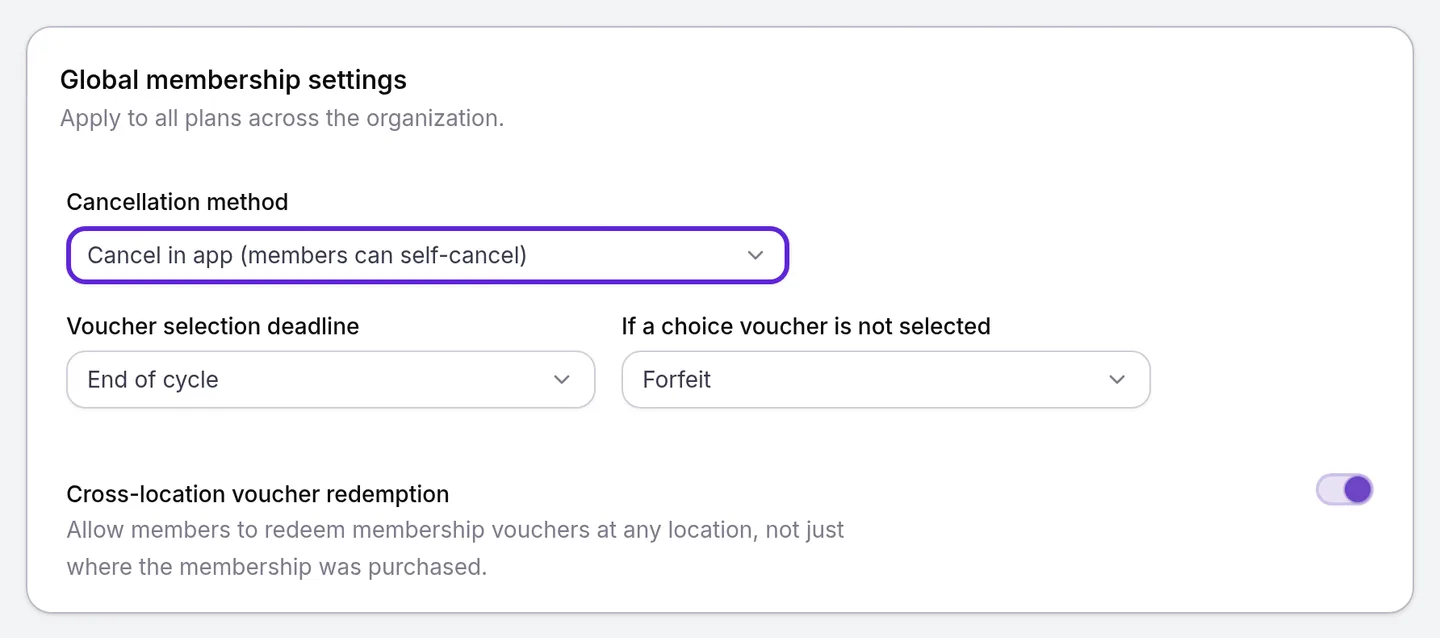
Select Save in the Unsaved changes bar to keep the first three. While Appointment Reminders is on, Velarya reminds members who still have a choice to make once the deadline is 7 days away, and tells them when the window closes.
Where to find memberships
Membership plans and the global settings are in Organization settings > Memberships. Each patient’s membership is on their profile:
- Open Clients and select the patient.
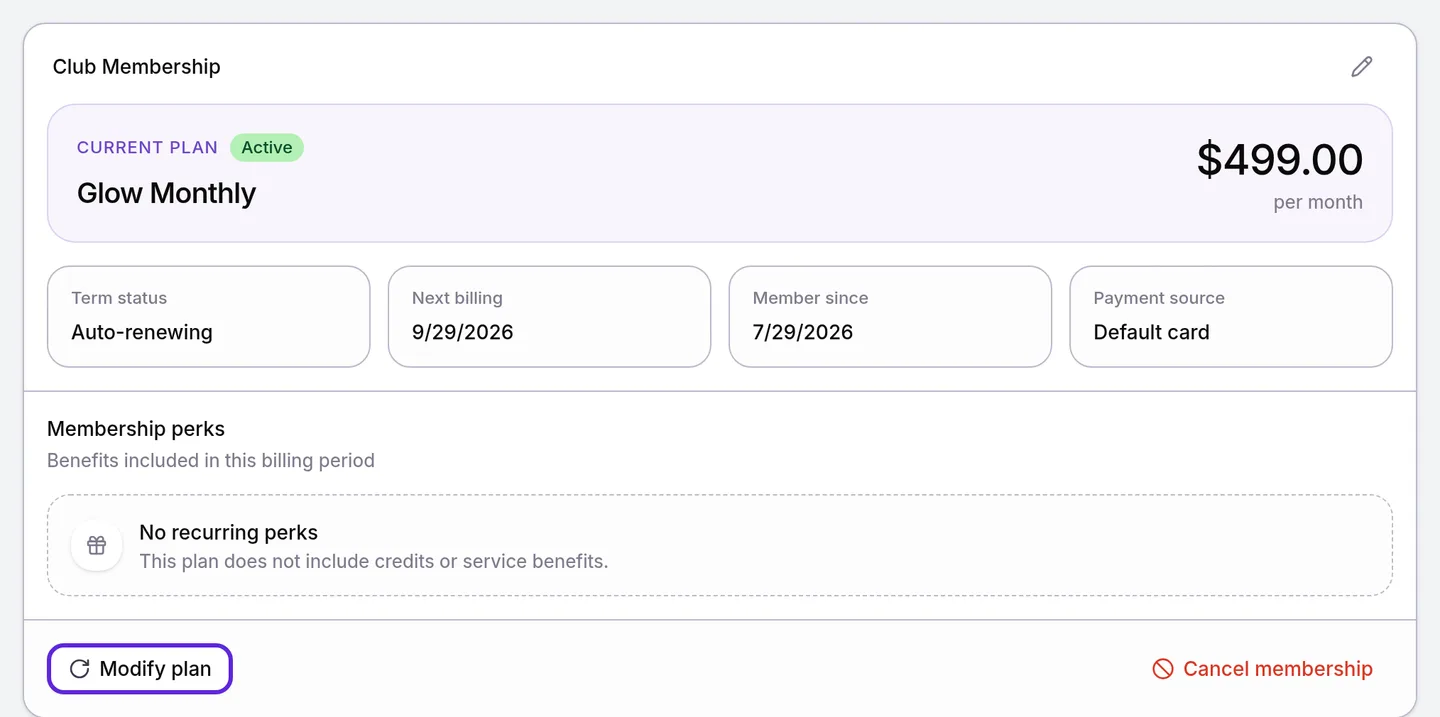
- Select the Memberships & Wallet tab. The Club Membership card shows their plan, Term status, Next billing and Member since, with Modify plan and Cancel membership below.
Frequently asked questions
Was this guide helpful?
Last verified
What changed
- : Changing a visit's Pricing row needs Discounts at checkout set to Override, and New Transaction strikes through the regular price beside the member's price. A new row explains how a discount code works with member pricing.
- : New Transaction shows each line at what the member pays, their member price or a lower birthday price, with a Total due that matches the saved sale. Price change notices follow each member's channel choices.