
How discounts combine
Updated Last verified against the product
In short
Velarya applies savings in one fixed order. Each treatment gets the lower of its member and birthday price, then vouchers apply, then one discount code, which adds to those prices only when set to combine with them and otherwise replaces them if it saves more. A Custom Discount ($) always comes off last, and wallet credit pays toward the rest.
- Who can do this
- Roles with Discounts, offers & vouchers set to Edit choose a code's combinations; roles with Discounts at checkout set to Apply enter codes and a Custom Discount ($); Admins and Location Managers change a visit's Pricing row
- Applies to
- Your whole practice, every location
- Plans
- Basic, Scale, Branded and Connected
- Time
- 5 minute read
Do discounts stack in Velarya?
Discounts in Velarya stack only by rule. Member pricing and a birthday discount never add together: each treatment gets the lower of the two. A discount code adds to them only when the code is set to combine with them, and otherwise the patient gets whichever saves more. A Custom Discount ($) always adds on top.
- Member pricing, the standing discount on the patient’s membership plan.
- A birthday discount, from a Birthday Gift set to Whole-shop discount (% off) or Category discount (% off), while the patient’s gift is active.
- A discount code, also called a promo code, that the patient enters when they book or your team enters before payment. Its Combinations, Member pricing and Birthday discounts, decide what it adds to.
- A Custom Discount ($), an amount your team types in the checkout panel or on a New Transaction.
Vouchers, wallet credit and points are not discounts. A voucher pays for one unit of a treatment, before any code. Wallet credit, including credit from redeemed points, pays toward the bill the way money does.
In what order does Velarya apply savings?
Velarya prices every sale in the same order, whether the patient books in the app or on your online booking page, or your team rings the sale up at the front desk. Each step works on what the step before it left, and the server works out the price, so the app, the dashboard and the receipt show the same total.
- Each treatment gets the lower of the patient’s member price and their birthday price. Member pricing applies the plan’s prices to the treatment and to any add-ons the plan discounts, with options at full price. A birthday discount takes its percentage off the whole treatment, options and add-ons included.
- A voucher makes one unit of its treatment free, at the price step 1 gave it. That unit takes no part in step 3.
- One discount code comes off what is left. A code for specific categories or services comes off each treatment it covers, and each keeps the lower of its step 1 price and the code’s price. A code for the entire visit comes off the visit’s subtotal once and is spread across the treatments in proportion to their price. Either way, the code starts from regular prices, or from member and birthday prices where it combines with them. A code that saves the same as step 1 or less is not used and counts no use.
- A Custom Discount ($) comes off on top, spread over the treatments still to be paid, and never takes the sale below $0.00.
- Wallet credit pays toward what is left, up to the patient’s balance. Velarya spends credit your practice gave, such as redeemed points, membership credit and bonuses, before credit the patient paid for.
- The patient pays the rest by card, cash or another method. A deposit taken at booking is worked out from the price after step 3, and counts toward it.
A code’s minimum spend counts the price after steps 1 and 2. Patients earn points on what their treatments cost after step 4, so paying with wallet credit leaves those points unchanged, as How points work explains.
What does a patient pay when several savings apply?
The examples below use two treatments from a sample menu: a Hydrafacial at $450.00 in the Facials category and a Neuromodulator at $950.00, $1,400.00 together. The patient’s membership plan takes 10% off every treatment, and their birthday gift takes 20% off Facials. Velarya rounds every percentage to the cent.
| What applies to the visit | Hydrafacial | Neuromodulator | The patient pays |
|---|---|---|---|
| Nothing | $450.00 | $950.00 | $1,400.00 |
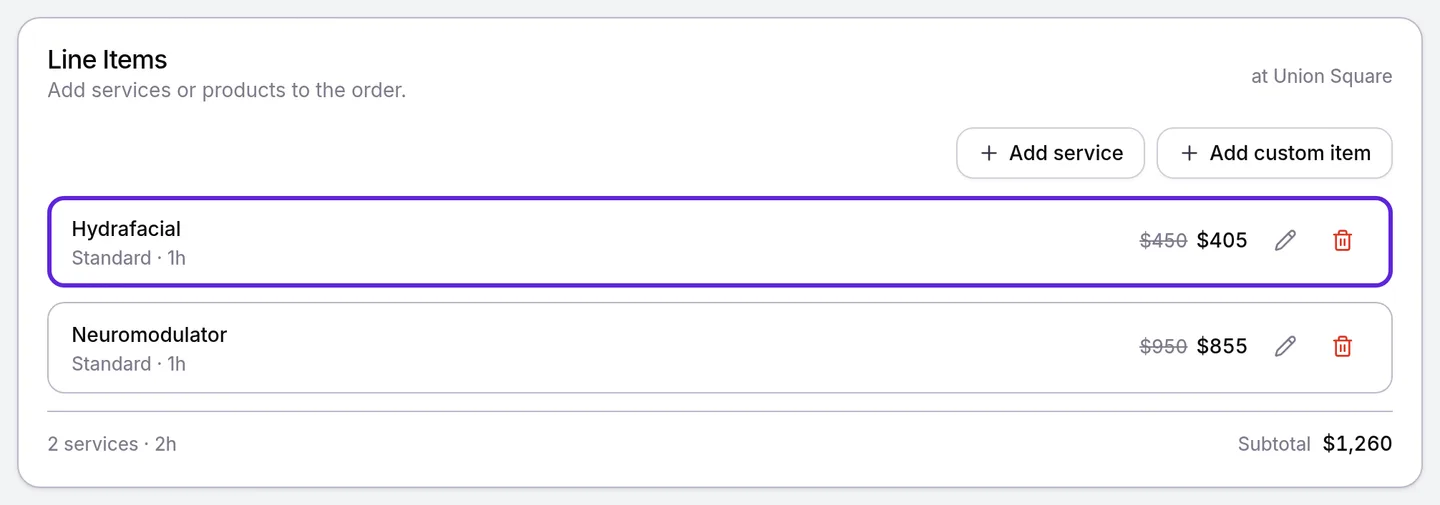
| Member pricing only | $405.00 | $855.00 | $1,260.00 |
| Member pricing and the birthday discount | $360.00, the birthday price | $855.00, the member price | $1,215.00 |
| Both, and a 10% code that combines with nothing | $360.00 | $855.00 | $1,215.00. The code would save $140.00, less than the $185.00 already saved, so it is not used |
| Both, and a 15% code that combines with nothing | $382.50 | $807.50 | $1,190.00. The code saves $210.00 on the regular prices, so it replaces the member and birthday prices |
| Member pricing only, and a 10% code that combines with member pricing | $364.50 | $769.50 | $1,134.00, 10% off the $1,260.00 member total |
| Both, and a 10% code that combines with member pricing and birthday discounts | $324.00 | $769.50 | $1,093.50, 10% off the $1,215.00 total |
An entire-visit code is spread over the treatments in proportion to the prices it came off, which is why the 15% code leaves the Hydrafacial at $382.50 and the Neuromodulator at $807.50.
Vouchers come before the code. Here a member on a plan that takes 15% off has a Hydrafacial voucher and books the Hydrafacial with a $380.00 chemical peel. They use a $50.00 entire-visit code that combines with member pricing, and your front desk adds $20.00 in Custom Discount ($).
| Step | Saving | Left to pay |
|---|---|---|
| Regular prices | $830.00 | |
| Member pricing, 15% off both treatments | $124.50 | $705.50 |
| The voucher pays for the Hydrafacial at its $382.50 member price | $382.50 | $323.00 |
| The $50.00 code comes off the peel’s member price | $50.00 | $273.00 |
| Custom Discount ($) | $20.00 | $253.00 |
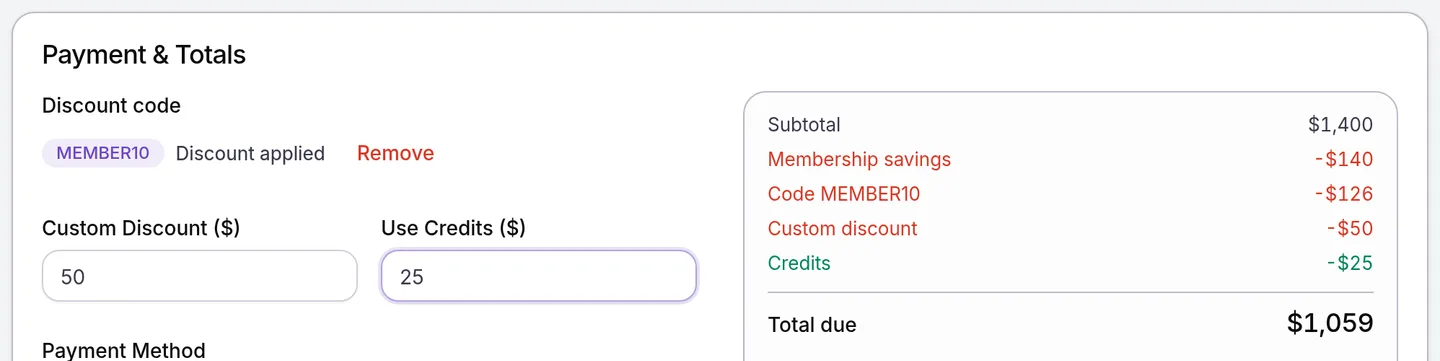
The rest of a sale follows the same order. Here the member-pricing visit from the first table is rung up as a New Transaction with the 10% code that combines with member pricing, a $50.00 custom discount and $25.00 of wallet credit:
| Step | What is left |
|---|---|
| Subtotal, at regular prices | $1,400.00 |
| Membership savings | $1,260.00 |
| Code MEMBER10 | $1,134.00 |
| Custom discount | $1,084.00 |
| Credits | $1,059.00 due |
| Points at an Earning Rule of 5 points per $1 | 5,420 points, earned on $1,084.00 |
How do vouchers, credit and checkout choices combine?
Velarya treats vouchers and wallet credit as ways to pay, so each one works alongside the savings a visit gets.
| The patient has | What Velarya does |
|---|---|
| A voucher and member pricing | Makes one unit of the voucher’s treatment free at its member price and keeps member prices on everything else |
| A voucher and a discount code | Takes the voucher first. The code works on what is left, and its minimum counts only what the patient pays |
| A voucher booked in the patient app | Shows the treatment as Free, with no code or credit to add |
| A discount code and wallet credit | Sets the price with the code and any member or birthday prices it combines with, then lets credit pay toward it |
| A code for specific treatments | Takes it off only those treatments; the rest keep their member, birthday or regular prices |
| A code that saves exactly what their member and birthday prices save | Keeps the member and birthday prices, and the code is shown as not used and counts no use |
| Points they want to spend | Turns them into wallet credit at 100 points to $1.00 when the patient redeems them in the patient app; that credit then pays like any other |
| Membership credit | Adds it to their wallet each cycle, where it pays after every discount |
| A category birthday discount | Weighs it only on treatments in that category |
| A visit your team switches to Non-member in the Pricing row | Charges regular prices, less any birthday discount |
| A visit switched to another plan in the Pricing row | Weighs that plan’s member prices against the birthday price |
| A deposit paid when they booked | Works the deposit out after member, birthday and code savings, and refuses a later change that would drop the total below what has been collected |
What do patients see?
Patients see each saving on its own row before they book, and one total saving afterwards.
- In the patient app, the booking review strikes through the regular total, and treatments show Member price or Birthday price. Each saving has its own row: Membership Savings, Birthday Gift and “🏷️ Discount (SPRING20)”, so a code that combines shows beside the prices it adds to. With credit, Wallet Credit and Due Now follow. A code that saves no more than their member or birthday price reads Not used, with “Your member price saves as much or more, so this code wasn’t used”.
- On your online booking page, the review strikes through the Subtotal and lists “👑 Membership savings (10%)”, “🎂 Birthday gift” and “🏷️ Code SPRING20”, one row each.
- The receipt shows the visit’s whole saving as one Discount line, followed by any Credits Applied, as Apply a discount at checkout shows.
What you can change
Velarya applies the steps in the same order for every practice, and these settings decide the amounts in each one.
| Setting | Where | Default | What it changes |
|---|---|---|---|
| Member Pricing on a plan | Organization settings > Memberships, in the plan | On, with the discounts you enter | Each treatment’s member price in step 1 |
| Birthday Gift | Organization settings > Rewards Program | Off | The birthday price in step 1, when the gift is a discount |
| A code’s Value and Applies to | Organization settings > Discounts & Offers | No codes | What the code saves in step 3, and on which treatments |
| A code’s Member pricing and Birthday discounts under Combinations | The same code | Both clear | Whether the code comes off member and birthday prices or competes with them |
| Pricing | The checkout panel, for one visit | The plan Velarya detected | Which member prices step 1 uses: the patient’s plan, another plan or Non-member |
| Custom Discount ($) | The checkout panel’s Discounts, and Payment & Totals on a New Transaction | $0.00 | The amount in step 4 |
To build these, see Create a membership plan, Set up a birthday gift and Create a discount code.
Where can staff see which saving applied?
Staff see every saving on a visit before they take payment, in Velarya’s New Transaction and checkout panel.
- On a New Transaction, each treatment shows the patient’s price with the regular price struck through, and Payment & Totals lists the Subtotal at regular prices, a row per saving, any Credits and the Total due. While Velarya works out the price, the totals read “Calculating…” and Complete Transaction waits.
- In the checkout panel, the Pricing row names the plan Velarya detected, such as “Detected: Essentials member”, and the Transaction Summary lists Membership savings, Birthday gift, Vouchers, the code and Custom discount, each on its own row.

To switch a visit’s pricing or add a code, follow Apply a discount at checkout.
Frequently asked questions
Was this guide helpful?
Last verified
What changed
- : Discount codes can now combine with member pricing and birthday discounts, vouchers come before the code, and the Custom Discount ($) also applies in the checkout panel. New worked examples, the not-used rule, and screenshots with a row per saving.