
Loyalty notifications patients receive
Updated Last verified against the product
In short
Velarya notifies patients when they get a birthday gift or earn or redeem points, and about their membership, from the welcome and a renewal reminder 3 days ahead to failed payments, price changes and its end. App users see each one under Notifications; most also arrive by push, and membership notices by email and text.
- Who can do this
- Admins and roles with Client personal info set to Edit
- Applies to
- Your whole practice, every location
- Plans
- Basic, Scale, Branded and Connected
- Time
- 5 minutes
Which loyalty notifications does Velarya send?
Velarya sends a patient a loyalty notification for a birthday gift, a reward earned or points redeemed, and the main moments of a paid membership: the welcome, renewal reminders and renewals, plan changes, a failed payment, a price change, fees and refunds, benefit and selection reminders, and the end of the plan. Patients with an app account find every one in the Notifications list, which the bell at the top right of the app opens. Most also arrive as a push notification, and membership notices go by email and text as well.
| Notification | When Velarya sends it | Channels |
|---|---|---|
| Birthday gift | On the patient’s birthday, once a year, while Birthday Gift is on and they are in its Eligible audience | App, push |
| Reward earned | As soon as points, wallet credit or a reward voucher lands for a paid visit, a check-in, a referral or the sign-up bonus | App, push |
| Points redeemed | When the patient turns points into wallet credit | App |
| Membership welcome | When a patient’s membership starts, once its first payment goes through or at once for a plan with no charge | App, push, email, text |
| Renewal reminder | About 3 days before a membership renews, once per billing period | App, push, email, text |
| Renewal charged | When a renewal payment goes through | App, push, email, text |
| Payment failed | When a renewal payment fails for the first time | App, push, email, text |
| Membership cancelled for non-payment | When the retry 7 days after the first failure also fails | App, push, email, text |
| Plan changed | When staff upgrade a member’s plan, or schedule a change to another plan | App, push, email, text |
| Price change | When you save a new price for the member’s plan, one notice per affected member | App, push, email, text |
| Early cancellation fee | When a cancellation inside a commitment charges the fee | App, push, email, text |
| Refund issued | When a cancellation refunds part of the billing period | App, push, email, text |
| Membership ended | When a cancellation takes effect: at the end of the billing period, or at once when staff cancel immediately | App, push, email, text |
| Benefit expiring | Once per membership voucher, when it has 7 days or less left | App, push, email, text |
| Unclaimed benefits | At most once a week while a membership holds unused vouchers | App, push, email, text |
| Selection deadline | Once per billing period, 7 days or less before the Voucher selection deadline, while choices are still open | App, push, email, text |
| Selection window closed | Once the deadline passes with choices left unpicked | App, push, email, text |
Every plan sends these; birthday gifts need Scale, Branded or Connected.
What do loyalty notifications say?
Velarya loyalty notifications carry a title and a message written for each patient: the words in brackets below are filled in with their first name, your practice’s name, the plan, dates and amounts. Patients read them in the Notifications list in the app, and for a membership notice the title is also the email’s subject and the email carries the same details.
| Notification | Title | Text |
|---|---|---|
| Birthday gift | Happy birthday! 🎂 | [Practice] gave you 20% off as a birthday gift. 🎂 Free-service and points gifts are worded to match, as Set up a birthday gift shows |
| Points redeemed | Points redeemed | You redeemed 1,000 points for $10.00 wallet credit. |
| Membership welcome | Welcome to [plan] 🎉 | Hi [name], welcome to [plan] at [practice]! We charged [amount] to get you started. Your benefits are ready to claim in the app. Next billing: [date]. |
| Renewal reminder | [Plan] renews in 3 days | Hi [name], your [plan] membership at [practice] renews in 3 days ([date]). Please make sure your payment method is up to date to avoid service interruption. |
| Renewal charged | Your [plan] just renewed | Hi [name], we charged [amount] for your [plan] membership at [practice]. Next billing date: [date]. |
| Payment failed | Please update your membership payment method | We could not collect your membership renewal at [practice]. Please update your saved card. We will retry in 3 days and your benefits remain active during the 7-day grace period. |
| Membership cancelled for non-payment | Your membership has been cancelled | We could not collect your membership renewal after three attempts, so your membership at [practice] has been cancelled. |
| Price change | Your [plan] price is changing | Hi [name], The price of your [plan] membership at [practice] is changing from [old price] to [new price] per [period]. The new price applies from your next renewal on [date]. |
| Membership ended | [Plan] has ended | Hi [name], your [plan] membership at [practice] has ended. We’d love to have you back whenever you’re ready. |
| Benefit expiring | You have a voucher expiring in [N] days | Hi [name], a membership benefit at [practice] expires on [date]. Use it before it’s gone. |
| Unclaimed benefits | You have 2 unclaimed benefits | Hi [name], your [plan] at [practice] still has 2 unclaimed benefits. Book an appointment to use them before they expire. |
| Selection deadline | 3 days left to pick your [plan] benefits | Hi [name], you have 2 unclaimed benefits on your [plan] membership at [practice]. Selections close in 3 days ([date], such as October 11). Then the rule you set under If a choice voucher is not selected, such as “Anything you don’t choose will be converted to credit.” |
| Selection window closed | Your [plan] selection window has closed | Hi [name], the selection deadline for your [plan] membership at [practice] just passed with 2 unclaimed benefits. A second sentence follows If a choice voucher is not selected: the benefits are forfeited, assigned to the first available service, or converted into wallet credit |
A reward notice names what the patient earned and what earned it, such as a paid visit, a check-in or a referral. A plan change notice names the new plan and either the amount charged for an upgrade or the date a scheduled change starts, and a fee or refund notice gives the amount. A renewal reminder for a plan paid at your front desk asks the member to settle the payment at their next visit instead. A price notice is written for each member’s outcome, such as keeping their price until a date or paying less; Change a membership price shows each version.
What do push notifications and texts say?
Velarya push notifications and text messages say only that something happened on the patient’s account, never the details, so neither one puts a name, plan, amount, treatment or birthday on the patient’s lock screen. The details wait in the app and, for membership notices, in the email.
The birthday gift push reads You have a gift: “A gift is waiting on your account. Open the app to see it.” Every reward earned sends the push Points added: “Points were added to your account. Open the app for details.” The membership notices read:
| Notification | Push notification |
|---|---|
| Membership welcome | Membership active: Your membership is active. Open the app to see what is included. |
| Renewal reminder | Membership renews soon: Your membership renews soon. Open the app for details. |
| Renewal charged | Membership renewed: Your membership renewed. Open the app for details. |
| Payment failed | Payment failed: A payment could not be processed. Open the app to update your payment method. |
| Price change | Membership price update: There is an update to your membership price. Open the app for details. |
| Early cancellation fee | Fee charged: A fee was charged to your payment method. Open the app for details. |
| Membership ended, or cancelled for non-payment | Membership ended: Your membership has ended. Open the app for details. |
| Benefit expiring | Benefit expiring soon: You have a benefit expiring soon. Open the app to use it. |
| Unclaimed benefits | Unclaimed benefits: You have unclaimed benefits. Open the app to use them. |
| Selection deadline | Selection window closing: Your selection window closes soon. Open the app to choose. |
| Selection window closed | Selection window closed: Your selection window has closed. Open the app for details. |
Each text message starts with “Velarya:”, repeats the first sentence of the push and ends “Details are in your email or the app.”, so the welcome text reads “Velarya: Your membership is active. Details are in your email or the app.” The failed-payment text ends “Please update your payment method in the app.” instead. A plan change or refund notice also says only that there is an update on the patient’s account.
How do patients choose their notification channels?
Each patient chooses which channels carry their Velarya loyalty notifications, and Velarya checks those choices at the moment it sends, so a change applies to the next notification. The Notifications list in the app always receives every notification for a patient with an app account.
| Channel | Velarya sends it when | A patient who joins in the app starts with |
|---|---|---|
| App | The patient has an app account | Always on |
| Push | Push is on and the patient allows notifications from the app on their phone | On |
| Email is on and the profile has an email address | On | |
| Text | SMS is on and the profile has a phone number | Off, unless they tick the text box when they sign in |
Text messages need the patient’s consent. When a patient signs in with their phone number, an optional box asks whether they want texts. Ticking it turns their texts on. The I want to receive SMS messages switch in the app shows the consent terms before a patient turns texts on: recurring automated messages, message and data rates, and Reply STOP to cancel, HELP for help.
Patients you add in Clients or from a walk-in on Front Desk start with Email and Push on and SMS off; turn on SMS Notifications once the patient agrees to texts. When that patient later creates their app account, the SMS setting you recorded stays as it is, unless they tick the text box, which turns texts on.
A reply of STOP, STOPALL, UNSUBSCRIBE, CANCEL, END, QUIT, REVOKE or OPTOUT to a text from your practice turns the patient’s SMS off at once. START or UNSTOP turns it back on only when a STOP reply turned it off. See Manage patients’ text consent and opt-outs for what a STOP changes on the profile.
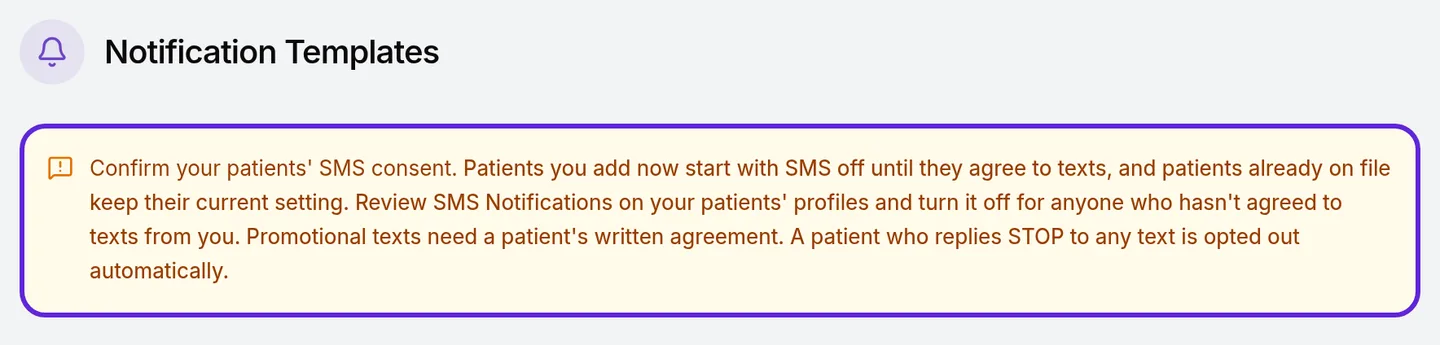
Notification Templates in Organization settings opens with Confirm your patients’ SMS consent. Patients already on file keep their SMS setting, and promotional texts need written agreement.
Check or change a patient’s choices
A patient’s profile in Clients shows which channels reach them, and staff can record a change the patient asks for.
- Open Clients and select the patient.
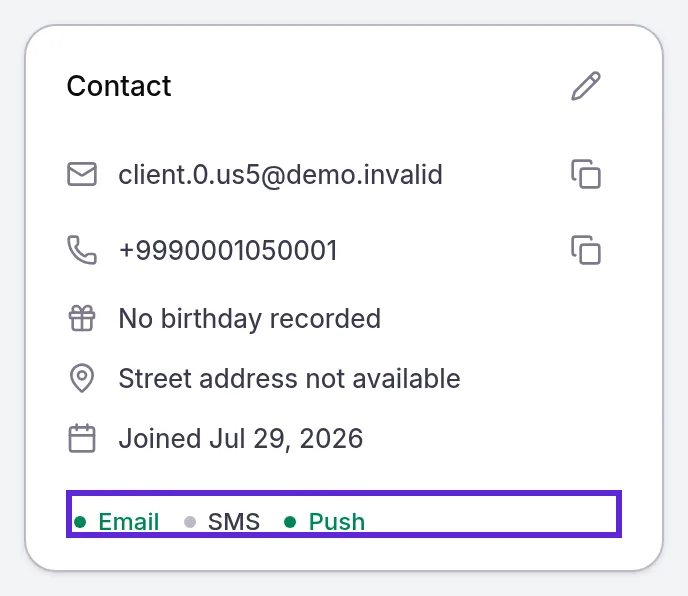
- Look at the bottom of the Contact card: Email, SMS and Push show in green when the channel is on and in grey when it is off.
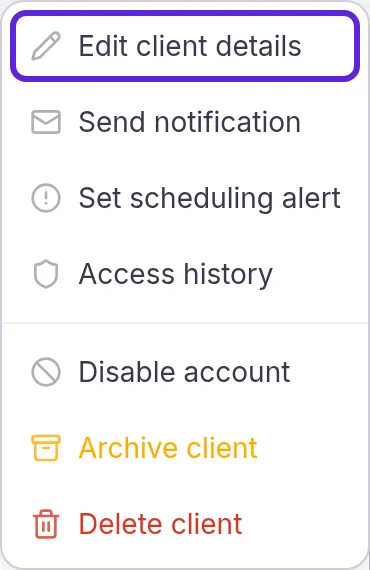
- Select More actions > Edit client details. Edit Patient Profile opens.
- Turn Email Notifications, SMS Notifications or Push Notifications on or off under Communication Preferences, as the patient asked.

- Select Update Profile. Client profile updated appears, and the next notification follows the new choices.
Change notifications in the patient app
Patients change their own channels in the patient app at any time.
- Tap the menu icon at the top left, then PROFILE & SETTINGS.
- Tap Communication preferences.
- Turn I want to receive emails, I want to receive SMS messages or I want to receive app push notifications on or off. Each switch saves as soon as they tap it.
Push also needs the phone to allow notifications from the app. New patients see Never miss an update when they sign up and choose Enable notifications or Not now. A patient who blocked them sees “Notifications are turned off. Open Settings to enable them.” and turns them on in the phone’s settings.
In the Notifications list, newest first, notifications the patient has not seen before show a dot.
Choose which notifications patients get
You choose which Velarya loyalty notifications patients get through the programs you run: each notification follows the setting behind it, and one patient’s channels follow their Communication Preferences.
| Notification | What controls it | Where |
|---|---|---|
| Birthday gift | Birthday Gift, its Gift type and its Eligible audience | Organization settings > Rewards Program |
| Reward earned | The Earning Rule, the Sign-Up Bonus, and the check-in and referral challenges | Organization settings > Rewards Program and Challenges |
| Membership notices | Your plans and the Voucher selection deadline | Organization settings > Memberships |
| Renewal reminder, and the benefit and selection reminders | The Appointment Reminders switch, on by default | Organization settings > Notification Templates |
| One patient’s channels | Communication Preferences | The patient’s profile in Clients |
For each program, see Set up a birthday gift, Set up points earning, Set up check-in rewards, How referral rewards work and How memberships work.
If something goes wrong
A member never gets text messages. Check on their profile that SMS is green and a phone number is on file. SMS starts off for patients you add in Clients or from a walk-in, and for patients who joined in the app without ticking the text box: turn it on once the patient agrees, or the patient turns on I want to receive SMS messages in the app. A patient who replied STOP to a text shows SMS in grey until they reply START.
A text you send with Send notification is refused. The patient hasn’t agreed to texts, or replied STOP. Send by Email or Push instead; Manage patients’ text consent and opt-outs covers both cases.
A birthday gift, reward or membership notice is in the app, but no push arrived. The patient’s push is off, or their phone blocks notifications from the app. Ask them to turn on I want to receive app push notifications and allow notifications in the phone’s settings.
A member didn’t get a renewal reminder. Check that Appointment Reminders is on in Notification Templates. The reminder goes about 3 days before an active membership renews. A member with a scheduled cancellation gets “[Plan] has ended” instead, as Change or cancel a membership explains.
Update Profile stays greyed out. Edit Patient Profile saves the whole profile, so fill in both First Name and Last Name, then select Update Profile.
A patient didn’t get a birthday message. The birthday gift goes only to patients in its audience who use the app and have a date of birth on file. See Set up a birthday gift for each check.
Frequently asked questions
Was this guide helpful?
Last verified
What changed
- : SMS starts off for walk-ins too; STOP and START replies, the SMS consent advisory on Notification Templates and the refused staff text are described; the contact channel and SMS switch screenshots were recaptured.