
Change a membership price
Updated Last verified against the product
In short
To change a membership price in Velarya, edit the plan in Organization settings > Memberships, enter the new Billing Amount and select Save. If current members would pay more, choose to move them at their next renewal, keep their price for 1 to 60 months, or keep it for life. New members pay the new price at once.
- Who can do this
- Admins and roles with Membership plan definitions set to Edit
- Applies to
- Your whole practice, every location
- Plans
- Basic, Scale, Branded and Connected
- Time
- 5 minutes
Before you begin
- The plan exists in Organization settings > Memberships: Create a membership plan.
Open the plan and enter the new price
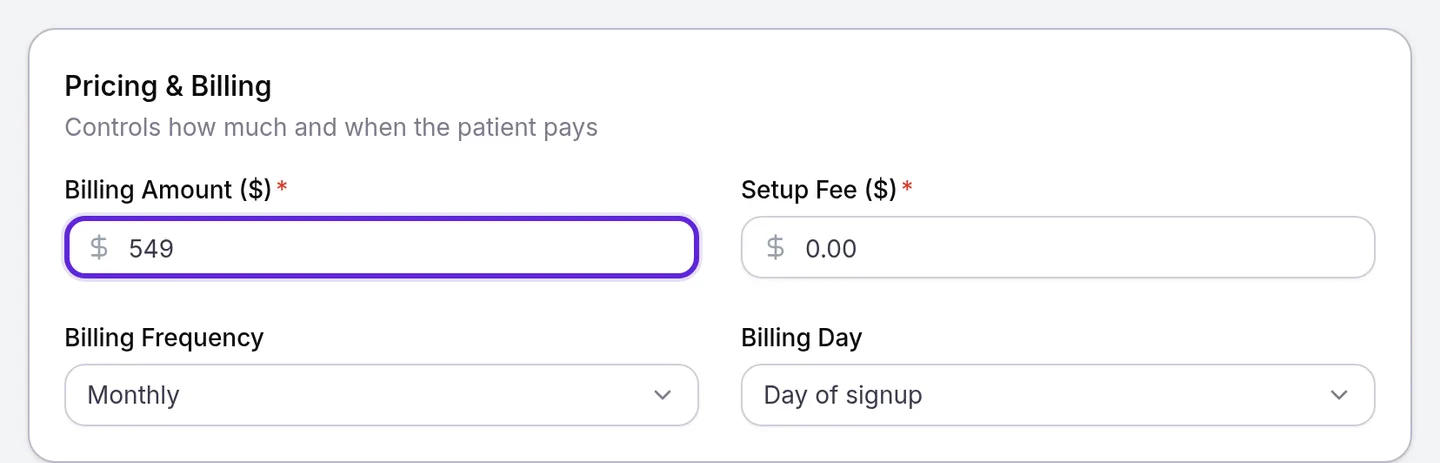
A membership price is the plan’s Billing Amount, set in Organization settings > Memberships for your whole practice. Each member pays their own price, the one they joined at, until a price change you save moves them.
- Open the menu at the bottom of the left sidebar and select Organization settings.
- Under Client Experience, select Memberships.
- Under Membership plans, select ⋯ at the end of the plan’s row, then Edit.
- In Pricing & Billing, enter the new Billing Amount ($), from $0 to $10,000. The Unsaved changes bar appears at the top of the page.
Choose what happens to current members
Saving a new Billing Amount makes Velarya compare it with what each member pays today. When a member’s price would change, a dialog opens before anything is saved; otherwise the plan saves at once.
- Select Save in the Unsaved changes bar. When any member would pay more, the dialog is This price increase affects current members, with a count such as “12 members already on this plan would pay more.” When members would only pay less, it is This price cut reaches current members.

- For members who would pay more, choose one option under How members who would pay more are affected:
- Move them at their next renewal: each member pays the new price from their next renewal.
- Keep their price for a set time: enter Months at their current price, a whole number from 1 to 60 (6 by default). Each member pays the new price from their first renewal after that.
- Keep their price for life: each member keeps their current price while they stay on the plan.
- Select Save Price Change. Velarya saves the plan, returns you to Memberships and sends each affected member one notice.
For a cut, skip step 2. Back closes the dialog without saving anything; your edits stay on the plan until you save again or select Discard.
What does each member pay after a price change?
After a Velarya membership price change, each member’s price depends on what they pay today: your choice in the dialog applies only to members who would pay more. New members pay the new price from the moment you save, in your app and when staff assign the plan.
| Member on the plan | What Velarya does |
|---|---|
| Pays less than the new price | Applies your choice, with a notice |
| Pays more than the new price | Moves them down to it at their next renewal, with a notice |
| Already pays exactly the new price | Keeps their price, with no notice |
| Cancelling at the end of their billing period | Keeps their price until the membership ends |
| Switching to another plan at their next renewal | Moves them to that plan’s price as scheduled |
| A renewal payment is being retried | Treats them as active; the retried payment keeps its amount |
If a member who was cancelling, switching or paused stays on the plan, your choice applies to them from then on, with the notice.
Here, Glow Monthly goes from $499 to $549 a month, saved on October 1, 2026, for a member whose membership renews on the 15th.
| Your choice | Oct 15, 2026 | Mar 15, 2027 | From Apr 15, 2027 | The member’s notice |
|---|---|---|---|---|
| Move them at their next renewal | $549.00 | $549.00 | $549.00 | Your Glow Monthly price is changing |
| Keep their price for a set time, 6 months | $499.00 | $499.00 | $549.00 | Your Glow Monthly price stays the same until April 1, 2027 |
| Keep their price for life | $499.00 | $499.00 | $499.00 | You keep your Glow Monthly price |
The 6 months count from the day you save, not from each member’s renewal, so they end on April 1, 2027 and April 15 is the first renewal at $549.00.
What do patients see?
Each affected member gets one notice about a Velarya membership price change, in the Notifications list in your app and by push, email and text, following the channels they allow. The email and the in-app notice name the plan, both prices and any date that applies; push and text say only that their membership price has an update. Loyalty notifications patients receive has the exact wording.
In the app, Price under Terms on the member’s Manage membership tab shows their own price: the new one from the moment you save when they move at their next renewal or pay less, and their current one while they keep it. Patients browsing the plan see the new price on its card.
Check what a member pays
The Club Membership card on a patient’s profile shows the price that member pays, which after a price change can differ from the plan’s Billing Amount.
- Open Clients and select the patient.
- Select the Memberships & Wallet tab.
- Read the price on the Club Membership card. For a member keeping an older price, the card also shows until when, or that it is for life. Next billing is the date of their next charge.
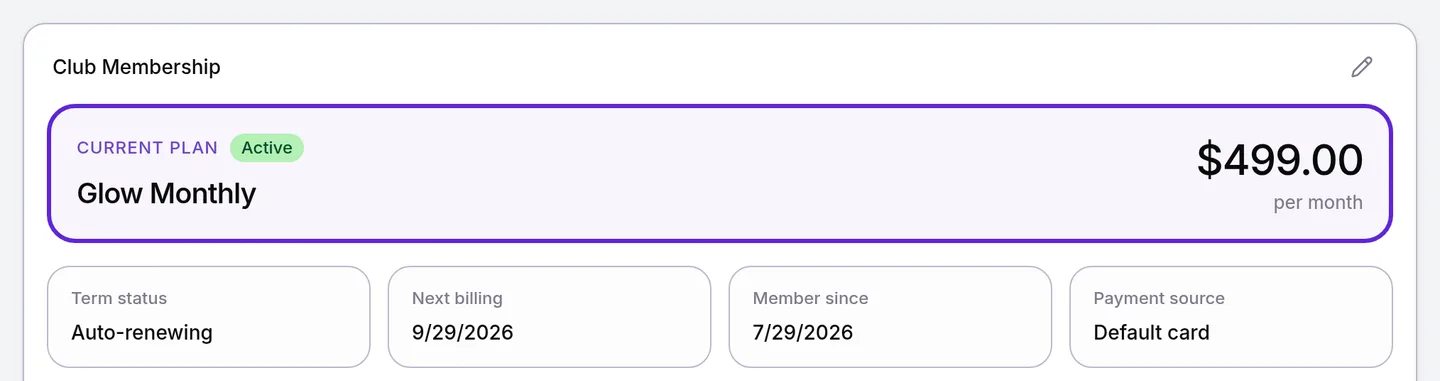
Seeing the card needs Member lifecycle (pause/resume/cancel/change-tier) at View. For renewals, retries and plan changes, see How memberships work.
Do other plan changes reach current members?
Other changes to a Velarya membership plan reach current members too, each on its own timing.
| What you change | When current members get it |
|---|---|
| Member Pricing discounts | Their next purchase, in the app and at your front desk |
| Member points earning rate | Their next sale that earns points |
| Credits and vouchers in Membership Components | The start of each member’s next cycle; what they received this cycle stays |
| Membership Join Bonus | Only patients who join after you save |
| Require Commitment, Commitment Length, Early Cancellation Penalty | Only patients who join after you save; members keep the terms they joined with |
| Membership Name, Card description, Details description | At once, in your app |
If something goes wrong
“Enter a whole number of months from 1 to 60”. Enter whole months, from 1 to 60, in Months at their current price.
Save Price Change is greyed out. Choose one of the three options first. With Keep their price for a set time, the months must be valid too.
“This plan’s price was changed by someone else. Reload and try again.” Another team member saved a new price for this plan at the same moment. Reload the page, check the Billing Amount, and enter your price again if it still needs changing.
“12 members are billed on this plan’s current frequency. Create a new plan to offer a different billing frequency.” The Billing Frequency was changed on a plan with members. Set it back, save the price, and create a new plan for the other frequency.
The plan’s row has no Edit. Changing a price needs Membership plan definitions at Edit; at View, plans are read only. Ask an Admin to update your role in Roles & Permissions.
A member didn’t receive the notice. Members paying exactly the new price, cancelling at period end or switching plans get none. Otherwise, check the Email, SMS and Push channels on their profile in Clients. SMS stays off for a patient your team added until they agree to texts. App users also have the notice in the app’s Notifications list.
Frequently asked questions
Was this guide helpful?
Last verified
What changed
- : Troubleshooting now notes that SMS stays off for patients your team adds until they agree to texts.