
Change or cancel a membership
Updated Last verified against the product
In short
To change or cancel a membership in Velarya, open the patient in Clients, select Memberships & Wallet, and use Modify plan or Cancel membership on the Club Membership card. An upgrade starts at once with a prorated charge, a downgrade starts on the next billing date, and a cancellation ends at the period end or immediately.
- Who can do this
- Admins and roles with Member lifecycle (pause/resume/cancel/change-tier) set to Manage
- Applies to
- Your whole practice, every location
- Plans
- Basic, Scale, Branded and Connected
- Time
- 5 minutes
Before you begin
- The patient is a member: they joined a plan in your app, or your team assigned one from their profile, as described in How memberships work.
- Your role holds Member lifecycle (pause/resume/cancel/change-tier) at Manage. Loyalty roles and permissions lists which roles have it.
Change a member’s plan
Staff move a Velarya member to another plan with Modify plan on the patient’s Club Membership card: an upgrade starts at once with a prorated charge, and a downgrade starts on the next billing date.
- Open the patient in Clients and select the Memberships & Wallet tab.
- In Club Membership, select Modify plan. Change Membership opens with the member’s Current Tier.
- Choose the new plan in Target Tier. The dialog shows when it starts and what the member pays now.
- For an upgrade, select Upgrade and Charge followed by the amount. Velarya charges the card on file and switches the member to the new plan at once. When nothing is due on the card now, the button reads Upgrade Now.
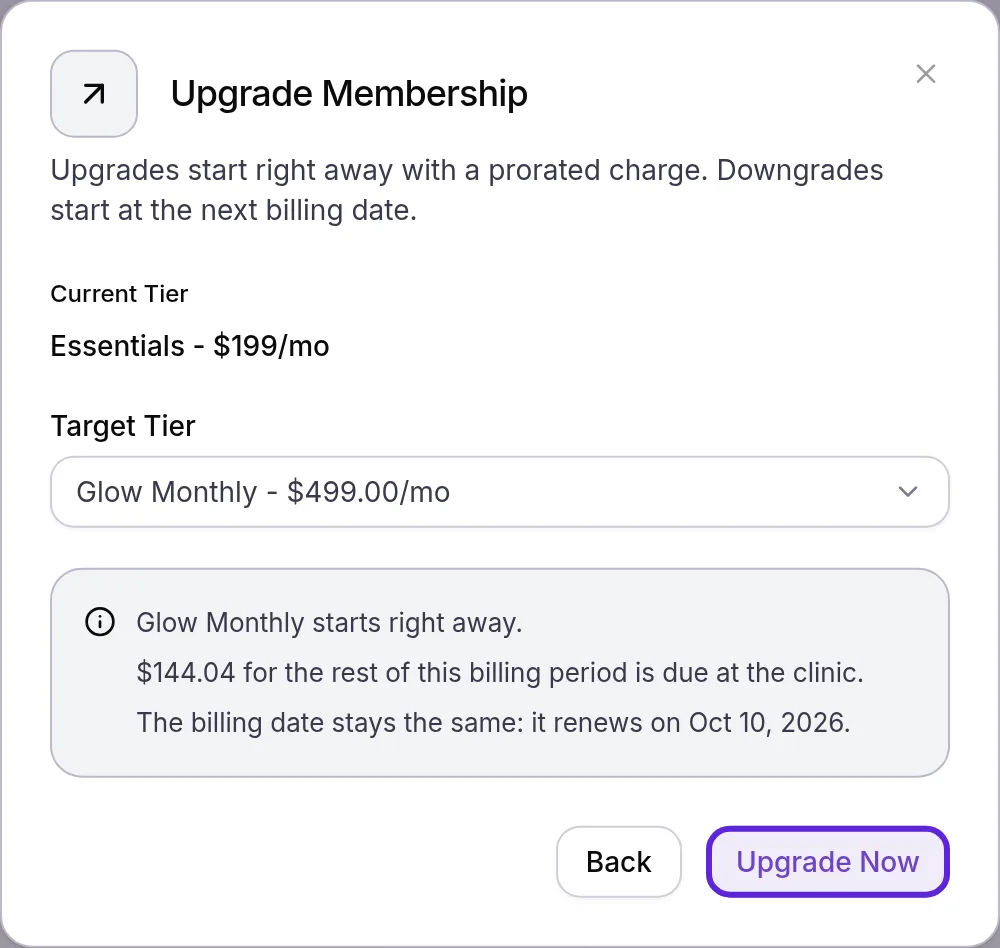
- For a downgrade, or a plan at the same monthly price, select Schedule Change. The member keeps their plan until the date shown, and the new plan starts with that renewal.
Velarya decides between an upgrade and a downgrade by comparing the new plan’s price with the price this member pays today, which can be lower than the plan’s list price when you changed the price and kept existing members on theirs.
An upgrade keeps the billing date, except an upgrade to a plan billed at a different frequency, which starts a new billing period that day. When a member moves to a plan billed at a different frequency and the unused part of what they prepaid is worth more than the new plan’s first charge, Velarya adds the difference to their wallet as credit, and the dialog, or Checkout in the app, shows that amount before the change is confirmed. How memberships work works through each case.
For a member billed at your practice, the dialog shows the amount as due at your practice, and it waits in Transactions for their next visit.
Velarya notifies the member of each change. A scheduled change shows on the Club Membership card with its start date, where staff can cancel it before it starts.
Cancel a membership
Staff cancel a Velarya membership from the Club Membership card at any time and choose whether it ends with the billing period or at once.
- In Club Membership, select Cancel membership. Cancel Membership opens.
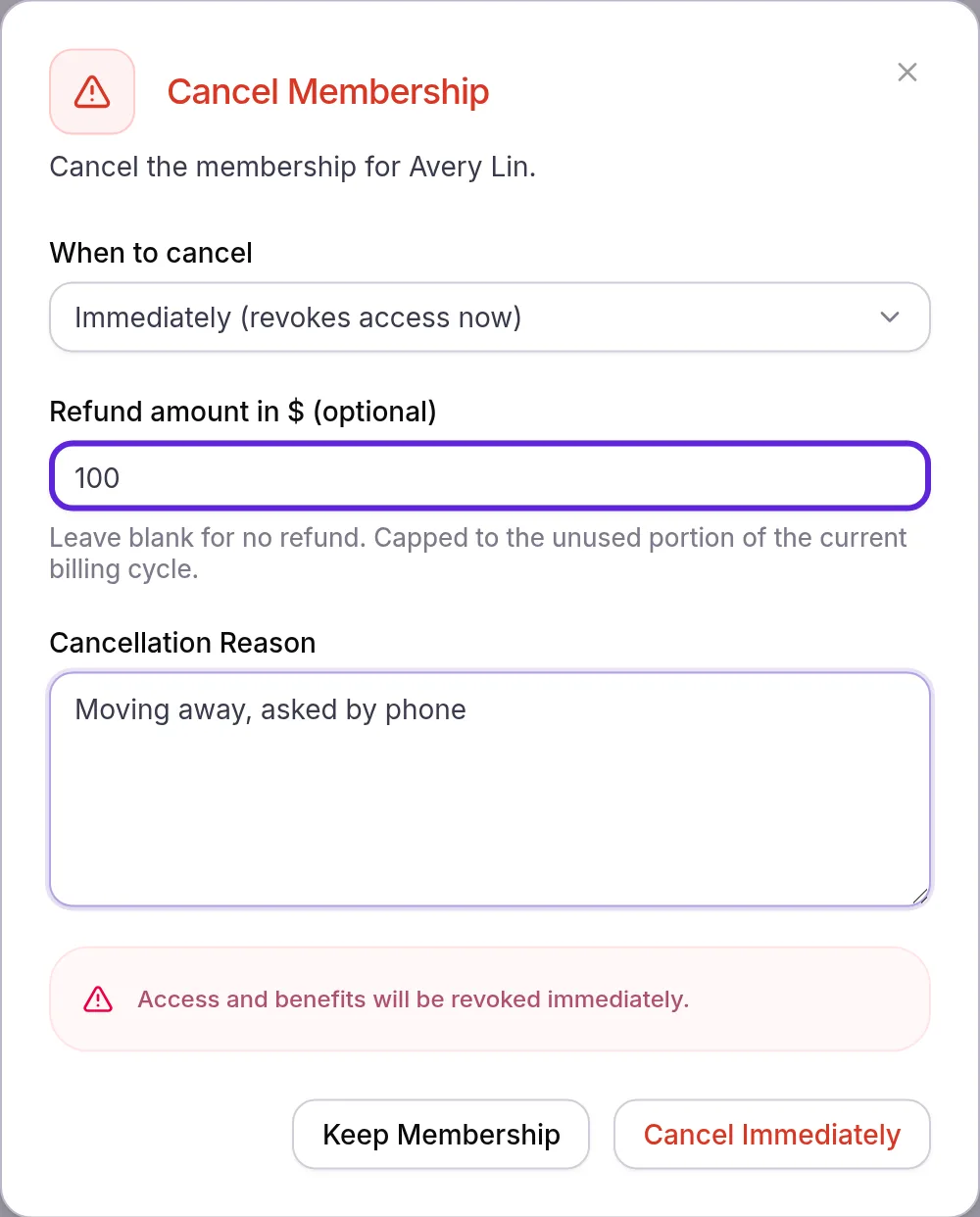
- Choose When to cancel: At period end (access until renewal) or Immediately (revokes access now).
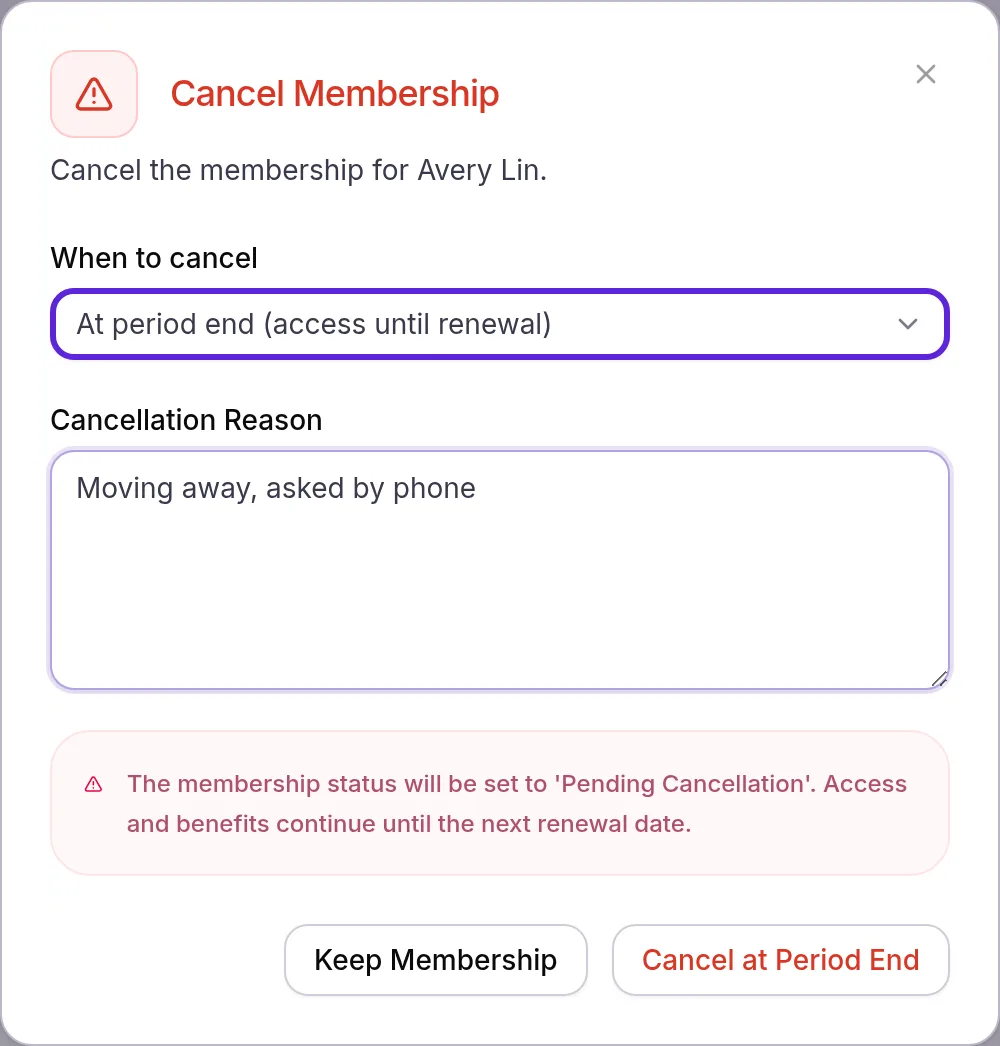
- For an immediate cancellation, enter a Refund amount in $ (optional), or leave it blank for no refund.
- If the member is inside their commitment, turn on Waive early cancellation fee to cancel without the fee.
- Enter a Cancellation Reason. The confirm button stays greyed out until you do.
- Select Cancel at Period End or Cancel Immediately. “Cancellation scheduled for the end of the cycle” or “Membership cancelled immediately” confirms it.
A cancellation at period end keeps everything in place until the renewal date: the card shows Pending cancellation and no renewal reminder goes out. On that date the membership ends with no further charge, and Velarya sends the member “[Plan] has ended”.
An immediate cancellation ends member pricing, unused membership credit and vouchers on the spot, and sends “[Plan] has ended” at once. Velarya issues the refund first: if it fails, you see the error and the membership stays active.
On an annual plan, Cancel membership opens Turn Off Auto-Renew: the member keeps the plan until the paid year ends and is not charged again. To give back part of that year, choose Refund on the payment in Transactions.
Deleting a patient cancels their membership first, while archiving leaves it running: see Update, archive or delete a patient.
What does a cancellation cost the member?
A Velarya cancellation adds no charge except an early cancellation fee inside a commitment, and only the refund you enter goes back. Take a Glow Monthly member charged $499.00 for September 10 to October 10, cancelled on September 26 with 14 of the 30 days left.
| What you choose | Charged | Refunded | Benefits |
|---|---|---|---|
| At period end (access until renewal) | Nothing | Nothing | Until October 10 |
| Immediately, refund of $100 | Nothing | $100.00 | End September 26 |
| Immediately, refund of $300 | Nothing | $232.87, the unused 14 days of the $499.00 charge | End September 26 |
| Any of these, 3 months into a 6-month commitment with a $150 fee | $150.00 to the card on file, or nothing with Waive early cancellation fee on | As above | As above |
Refunds are capped at the unused share of the billing period and rounded to the cent. If the member’s card declines an early cancellation fee, the cancellation still goes through, Velarya tells you the fee was not collected, and it waits as an unpaid order in Transactions.
Undo a pending cancellation
A Velarya cancellation set for the period end can be undone until that date. While it is pending, Undo cancellation replaces Modify plan on the Club Membership card. Selecting it shows “Membership reactivated successfully”, and Term status reads Auto-renewing again.
The membership then renews as normal, and any early cancellation fee charged for that cancellation is refunded to the member’s card. Undo cancellation clears only the scheduled cancellation, so a past-due membership keeps its Action required badge until its payment goes through. After an immediate cancellation, or once the period has ended, a patient who wants to return joins again, as in Sell a membership to a patient.
Pause and resume a membership
A pause in Velarya stops a member’s billing for a set time, on any plan with Allow Pausing on, as set in Create a membership plan. Staff pause and resume a membership from the Club Membership card on the patient’s profile.
- A pause lasts up to the plan’s Max Duration (Months), 3 by default, at most Limit per year times a year, 2 by default.
- While paused, the member is not billed and receives no new credit or vouchers.
- The membership resumes on its own on the resume date, or earlier when staff resume it.
- With Pause extends commitment on, the default, the paused months are added to the member’s commitment.
- The card and the app show the membership as paused, with its resume date.
Let members cancel in the app, or ask them to call
The Cancellation method in your global membership settings decides whether members can cancel in your app. It applies to every plan, and staff can always cancel from the patient’s profile.
- Open Organization settings > Memberships.
- In Global membership settings, choose a Cancellation method: Cancel in app (members can self-cancel), the default, or Call to cancel (hide the in-app button).
- Select Save in the Unsaved changes bar. Members see the change the next time they open their plan.
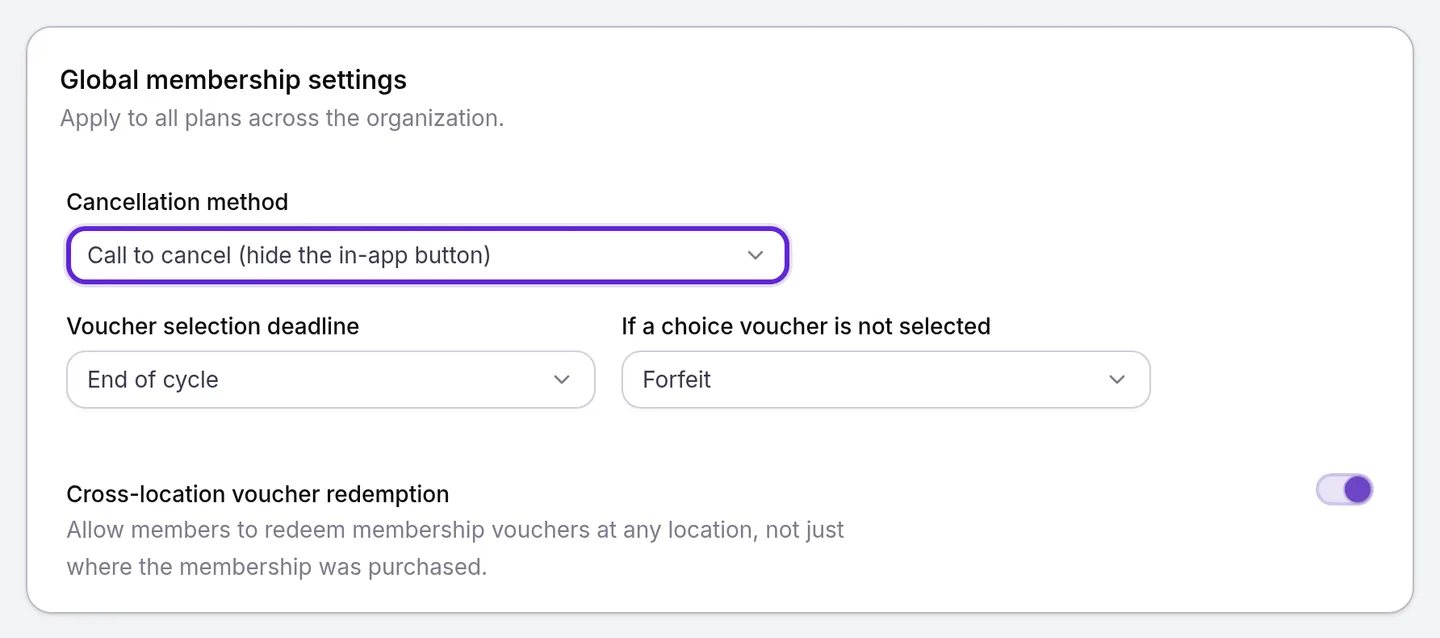
With Call to cancel, members see Want to cancel? and your practice’s phone number in place of the button. Changing the setting needs Membership plan definitions at Edit.
What do members see in the app?
Members manage their Velarya membership in your app under Memberships, on their plan’s Manage membership tab.
- Changing plans. Upgrade/Downgrade membership leads to your other plans. Checkout shows what the member pays now and when the new plan starts, and Confirm Change completes it. An upgrade is paid by card and starts at once; a queued change shows as Plan change queued, and Cancel scheduled change removes it.
- Cancelling. Cancel membership explains that they keep their benefits until the renewal date with no refund, and that an early cancellation fee may apply inside a commitment. After Yes, Cancel Membership (Turn Off Auto-Renew on an annual plan), the plan shows the date access ends.
Each membership notice is listed in Loyalty notifications patients receive.
If something goes wrong
“The member’s card on file was not charged, so the plan was not changed.” The card declined the upgrade charge. Ask the member to update their card under Manage payment methods in the app, or add the new card under Stored Methods and remove the declined one, then try again.
“We could not confirm the card charge. Try the upgrade again; the member will not be charged twice.” Confirm the same upgrade again: Velarya reuses the first charge, so the member pays once.
“The clinic’s payment account cannot take this charge. Check Payments settings, then try again.” Open Organization settings > Payments and finish what it asks for, as Connect your payment account explains; members upgrading in the app see “This clinic hasn’t finished setting up card payments, so nothing was charged.” instead. “Card charges are unavailable right now. Try again shortly.” means the problem is on Velarya’s side: wait a few minutes.
“This membership has no active billing period, so the plan change cannot be priced.” The membership has no current billing dates on file. Contact Velarya support to check it.
A refund fails with a message ending “The membership was not cancelled.” Nothing changed. Try again, or cancel without a refund and refund the payment from Transactions.
“Only a membership set to cancel at the end of its billing period can be reactivated.” The billing period ended while the profile was open, so the membership has ended, or a teammate already undid the cancellation. Reload the patient’s profile. If the plan is gone from the Club Membership card, sell the patient a new membership.
Modify plan and Cancel membership are missing. Your role holds Member lifecycle (pause/resume/cancel/change-tier) at View rather than Manage, or the membership has a pending cancellation and the card shows Undo cancellation.
Frequently asked questions
Was this guide helpful?
Last verified
What changed
- : Undo cancellation now reads Auto-renewing under Term status and changes nothing else about the membership. New troubleshooting entry for the message shown when the billing period has already ended.