
How loyalty works across locations
Updated Last verified against the product
In short
Velarya runs one loyalty program across all your locations. Each patient has one points balance and one wallet, plus one membership once they buy a plan, all valid at every location. The Earning Rule, sign-up bonus, birthday gift and challenges are set once in Organization settings, and each location chooses the memberships it sells.
- Who can do this
- Admins and Location Managers choose each location's memberships and staff; roles with Rewards & loyalty program set to Edit change practice-wide rewards
- Applies to
- Your whole practice, every location
- Plans
- Basic, Scale, Branded and Connected
- Time
- 6 minute read
What does one loyalty program across locations mean?
Velarya runs one loyalty program for your whole practice, however many locations you have. Each patient has one profile, one points balance and one wallet, plus one membership once they buy a plan, and each of them works at all your locations.
- A patient redeems points earned at one location for wallet credit in the app, and spends the credit at any location.
- A membership bought at one location gives its member pricing, credit and points rate at every location.
- Your team at each location opens the same patient profile in Clients, with the same Wallet and Rewards balances.
- Patients use one app for your practice and choose the location they want to visit.
How do points and credit follow a patient between locations?
Velarya keeps points and wallet credit on the patient rather than on a location, so they go wherever the patient goes with nothing to transfer. In this example, a patient joins at Union Square and later visits Marina. The Earning Rule is 5 points per $1, the sign-up bonus is 250 points and the check-in challenge gives 50 points.
| Where | What happens | Points | Points balance | Wallet |
|---|---|---|---|---|
| Union Square | Joins your practice in the app | +250 | 250 | $0.00 |
| Union Square | Pays $450.00 for a Hydrafacial | +2,250 | 2,500 | $0.00 |
| Marina | Is checked in at the front desk with the QR code in their app | +50 | 2,550 | $0.00 |
| The app | Redeems 2,500 points | -2,500 | 50 | $25.00 |
| Marina | Pays for a $380.00 chemical peel with the $25.00 of credit and $355.00 by card | +1,900 | 1,950 | $0.00 |
Points are counted on each treatment’s price at the location where the patient pays, so a location that prices a treatment differently awards points on its own price. For the full earning and redemption rules, see How points work.
What is set once for your whole practice?
The rules of Velarya’s loyalty program live in Organization settings and apply at every location, so a patient earns and redeems on one set of terms wherever they visit.
| Setting | Where | At every location |
|---|---|---|
| Earning Rule | Rewards Program | Patients earn on one Earning Rule wherever they visit |
| Exchange Rate | Rewards Program | 100 points are worth $1.00 of wallet credit |
| Sign-Up Bonus | Rewards Program | Each patient receives it once, when they join your practice in the app, whichever location they choose |
| Birthday Gift | Rewards Program | One gift a year per patient, usable at any location |
| Check-In challenge | Challenges | Check-in points join the patient’s one balance; the Frequency limit and Max check-ins per patient count check-ins at all your locations together |
| Refer a Friend | Challenges | Pays the rewards you set, whichever location the friend visits |
| Membership plans | Memberships | Each plan is built once, with its credit, vouchers, member pricing and Member points earning rate, and each location chooses whether to sell it |
| Discount codes | Discounts & Offers | Each code is unique across your practice, and its Total uses and Limit to one use per patient count uses at all your locations together |
To set the program up, see Set up points earning and Set up a birthday gift.
What can differ between locations?
Four Velarya settings decide what happens at each location. Each location chooses the memberships it sells in its own Location Settings. Where membership vouchers are redeemed, which locations accept each discount code and where each staff member works are set once for the practice, in Organization settings.
| Setting | Where you set it | Default | Effect |
|---|---|---|---|
| The membership plans a location sells | Manage > Memberships | Every plan | Disable for this location takes a plan off sale there, in the app and at the desk |
| Where membership vouchers are redeemed | Cross-location voucher redemption under Global membership settings in Organization settings > Memberships | On: every location | Off: each membership’s vouchers are redeemed only at the location where it was bought, its Purchase Branch. Admins change it, and the switch saves at once |
| The locations that accept a discount code | Eligible locations on the code | Every location | Only the chosen locations accept the code |
| The locations a staff member works at | Location Assignments on each staff member’s profile | The locations you assign | Staff work at their assigned locations, and per-location permissions apply at the location they are working in |

Vouchers from a sign-up bonus, a birthday gift, a referral or a treatment bought in the app are redeemed at every location. For how members use their vouchers and credit, see How memberships work. To build plans and codes, see Create a membership plan and Create a discount code. For redeeming at the desk, see Redeem a voucher at checkout.
Choose which memberships each location sells
A membership plan is built once for your practice, and each location decides whether to sell it. Admins and Location Managers switch plans on or off for the locations they work at.
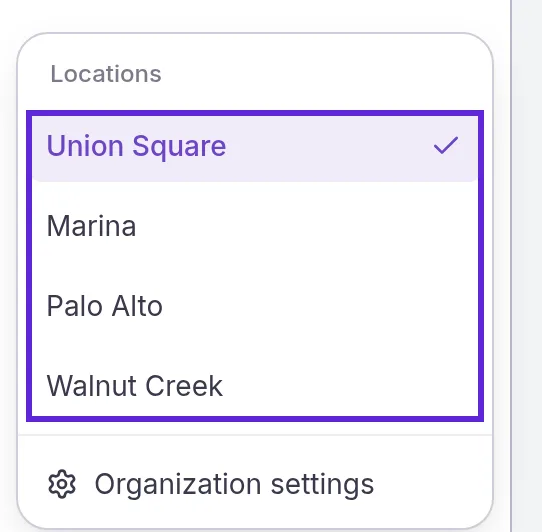
- Open the menu at the bottom of the left sidebar and choose the location under Locations.
- Select Manage in the left sidebar. Location Settings opens, with the location’s name at the top.
- Under Client Experience, select Memberships. Each plan shows Enabled here or Disabled here.
- Open the menu at the end of the plan’s row and choose Disable for this location. The plan’s badge changes to Disabled here at once, with nothing to save.
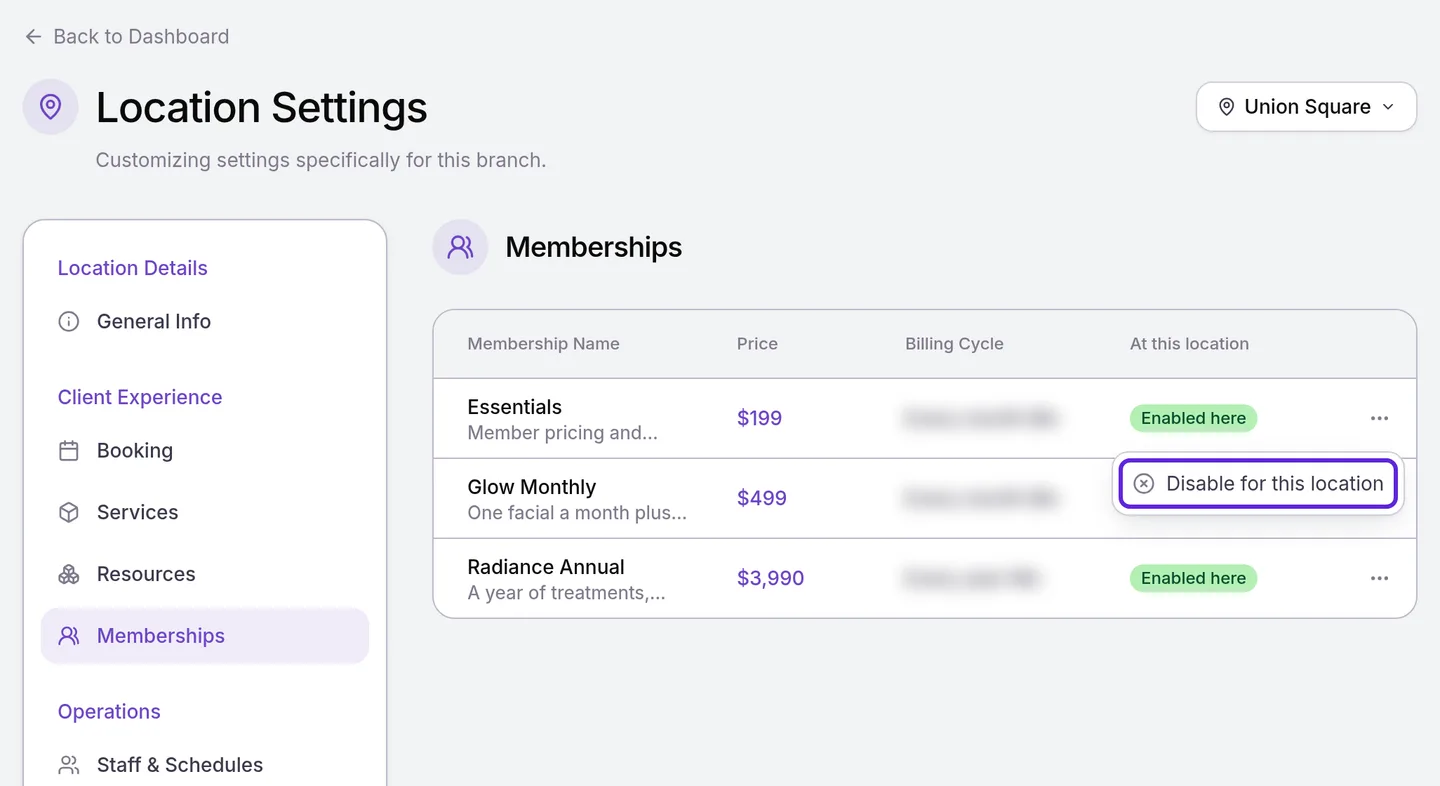
To sell the plan there again, choose Enable for this location. A new location sells every plan until you disable one there. Patients who choose that location in the app see only the plans it sells, and Assign Membership lists only those plans when that location is the Purchase Branch.
What do patients see at a second location?
Patients see the same Velarya points balance and wallet at every location, because both belong to your practice.
- Choosing a location. In the app menu, patients open PROFILE & SETTINGS and select Select your location. The location they choose sets the treatments, providers and appointment times they see. Their points and credit on Home and Rewards stay the same.
- Booking. The booking uses that location’s prices. Member pricing, a birthday discount and wallet credit apply as they do everywhere. A code limited to other locations shows “This discount code is not valid at this location” under Add a discount code, before the patient books.
- Memberships. The app lists the plans that location sells. A member’s own plan stays under Manage my membership wherever they are.
- At the front desk. Staff check the patient in by scanning the QR code in their app, and the check-in points join the same balance, as Check in a patient with a QR code shows.
Assign staff to locations
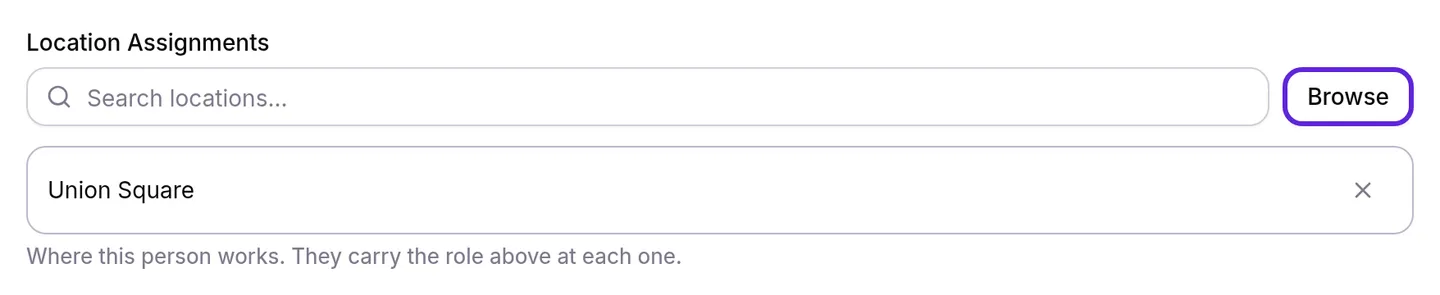
Location Assignments on a staff member’s Velarya profile set the locations they work at, and per-location loyalty permissions apply at the location they are working in. Admins work at every location. Changing assignments needs Staff directory at manage, which Admins and Location Managers hold.
- Open the menu at the bottom of the left sidebar and select Organization settings.
- Select Staff Directory under Staff.
- Select the staff member. Their profile opens on Overview.
- Select Browse under Location Assignments. Assign Locations opens.
- Tick each location they work at, and select Done.
- Select Save. Profile saved appears.
The location menu at the bottom of the left sidebar lists only the locations a staff member works at. Loyalty roles and permissions lists which loyalty permissions apply at each location and which cover the whole practice.
How do you see loyalty across all your locations?
Velarya shows each patient’s Wallet and Rewards balances for your whole practice on their profile in Clients, and the Point Ledger, Check-Ins and Transactions one location at a time, with All locations for admins.
| Where | What it shows |
|---|---|
| Point Ledger, at the bottom of Rewards Program | Point awards, redemptions and adjustments at the location chosen in its own location menu, which starts on the location you are working in. Sign-up bonus, birthday gift, referral reward and app redemption rows appear under every location. To read the ledger, see Set up points earning |
| Rewards > Check-Ins | Check-ins at the location you are working in, with a Location column |
| Rewards > Referrals | Every referral in your practice, whichever location you are working in, with a Location column for the location each friend chose when they joined |
| Transactions | Sales at the location you are working in |
Admins with more than one location choose All locations in the menu at the bottom of the left sidebar, and Check-Ins and Transactions then list every location together. The Point Ledger has its own location menu next to its heading, with All locations for admins.
Frequently asked questions
Was this guide helpful?
Last verified
What changed
- : The Referrals log now shows the location each friend chose when they joined, in a Location column.
- : Discount code settings use the new code window's names: Eligible locations, Total uses and one use per patient, all counted across your locations.