
Let members choose their included treatments
Updated Last verified against the product
In short
A Velarya choice voucher lets each member pick their included treatments from a list you set, in your app, every cycle. Add several treatments to a plan's voucher in Organization settings > Memberships, then set the Voucher selection deadline and what happens to choices left unpicked. Staff can also pick for a member.
- Who can do this
- Admins and roles with Membership plan definitions set to Edit; picking for a member needs Member lifecycle (pause/resume/cancel/change-tier) set to Manage
- Applies to
- Your whole practice, every location
- Plans
- Basic, Scale, Branded and Connected
- Time
- 10 minutes
Before you begin
- You have a membership plan, or are building one: Create a membership plan.
- The treatments you want to offer have prices in Organization settings > Service Catalog, because Convert to credit is worked out from them.
Build a choice into a plan
A choice voucher is a Vouchers Component with more than one treatment, or a whole category, on it: each cycle, members pick Claims Per Cycle of those treatments in your app. The rest of the plan builder is covered in Create a membership plan.
- Open the menu at the bottom of the left sidebar and select Organization settings.
- Under Client Experience, select Memberships.
- Open a plan under Membership plans, or select Add plan.
- Under Membership Components, select Add Vouchers.
- Under Select Services, select Browse, tick the treatments members choose from, and select Done. To offer every treatment in a category, add it under Or whole categories.
- Enter Claims Per Cycle: how many different treatments a member picks each cycle, up to the number on the list. The component shows the result, such as Pick 1 of 3.
- Choose Cycle Duration (Months): 1 month opens a new choice every month.
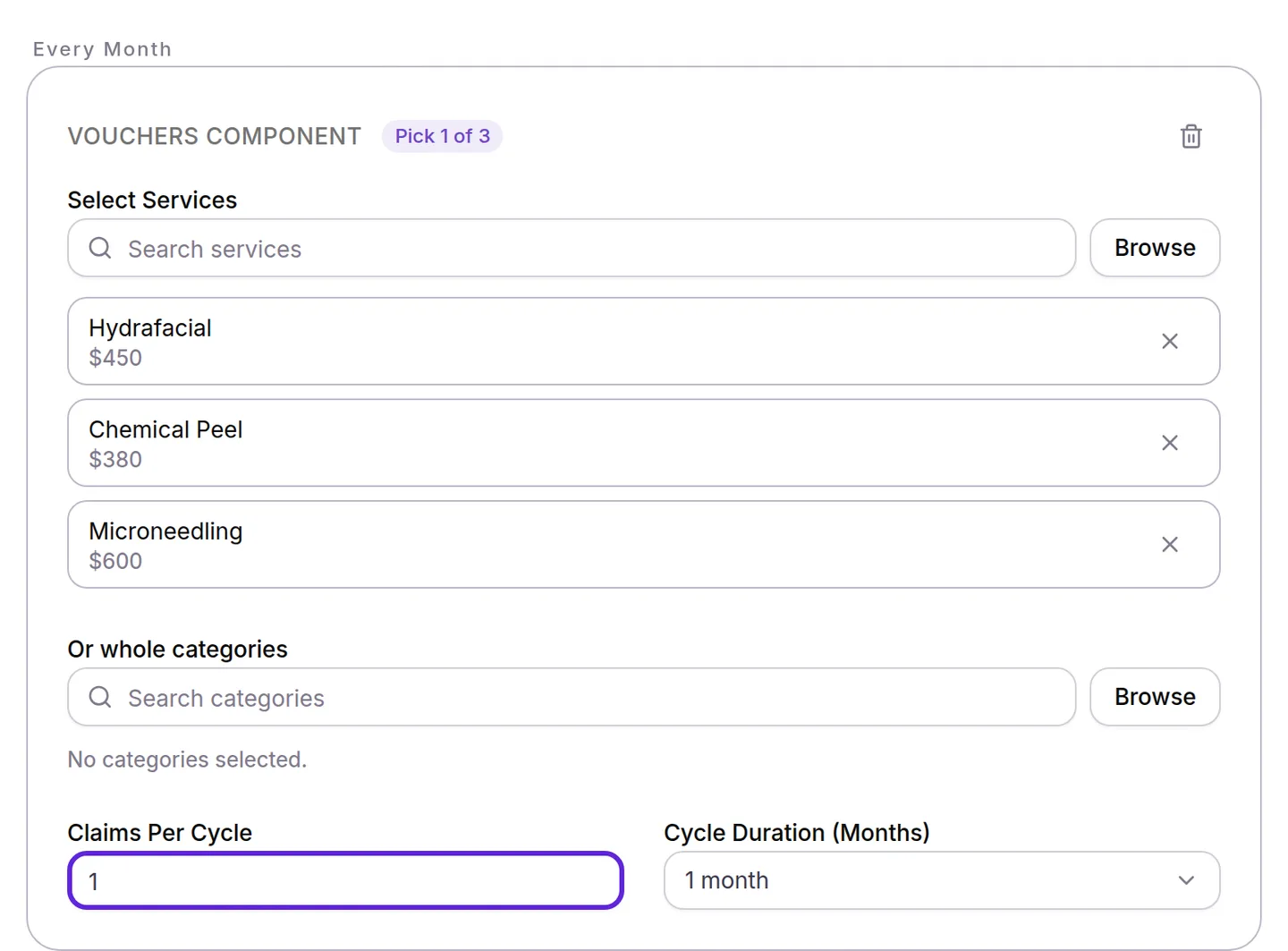
- Select Save in the Unsaved changes bar at the top of the page. Velarya returns you to Memberships.
Cycles count from the day each membership started, shown as Member since on the patient’s Club Membership card, and each treatment on the list can be picked once per cycle. A voucher with exactly one treatment is not a choice: Velarya issues it on its own every cycle.
Set the selection deadline
The Voucher selection deadline in Global membership settings, at the top of Organization settings > Memberships, decides when choices close in each cycle, for every plan.
- Open Voucher selection deadline and choose End of cycle, the default, or Custom day.
- For Custom day, choose a Deadline day (1-28): how many days after each cycle starts choices stay open.
- Select Save in the Unsaved changes bar.
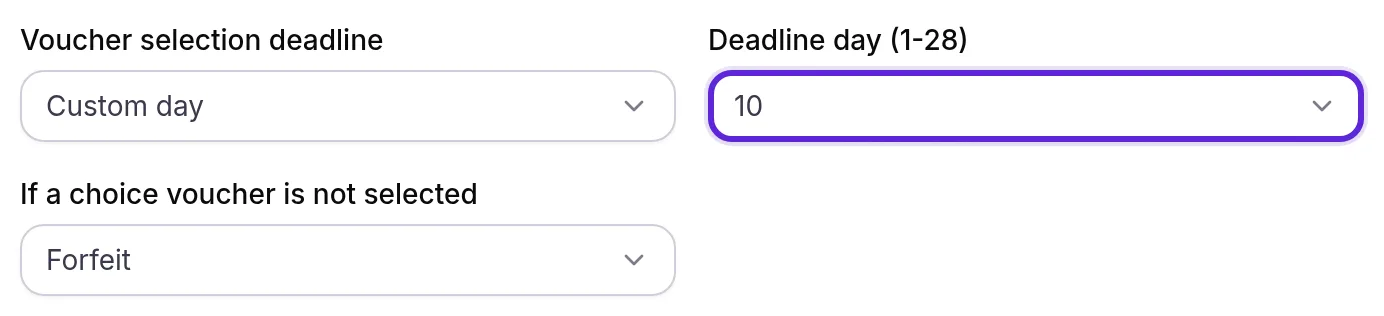
Custom day counts from the start of each member’s own cycle, not from a date in the month. With a Deadline day of 10, a cycle that starts on October 1 closes on October 11, and one that starts on October 17 closes on October 27. End of cycle keeps choices open until the next cycle starts.
What happens to treatments a member doesn’t pick?
Treatments a member leaves unpicked follow If a choice voucher is not selected, which Velarya applies once per cycle, when the deadline passes.
- In Global membership settings, open If a choice voucher is not selected.
- Choose Forfeit, the default, Auto-select first option or Convert to credit.
- Select Save in the Unsaved changes bar.
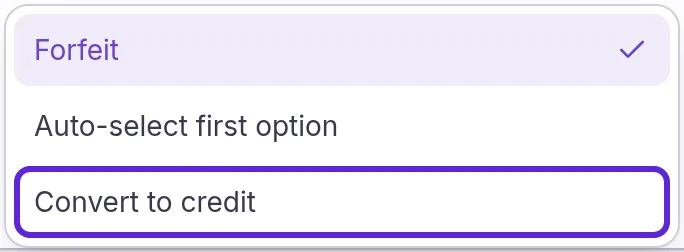
For a Pick 1 of 3 voucher listing Hydrafacial ($450), Chemical Peel ($380) and Microneedling ($600), left unpicked:
| Setting | What the member has after the deadline |
|---|---|
| Forfeit | Nothing more this cycle; the next cycle opens a fresh choice |
| Auto-select first option | A voucher for Hydrafacial, the first treatment on the list |
| Convert to credit | $380.00 of wallet credit, the price of the cheapest treatment |
Each open choice counts on its own: on a Pick 2 of 3 voucher where the member picked one treatment, only the second choice is auto-selected or converted. The member then gets a notice that their selection window has closed, saying what happened to the rest.
Pick a treatment for a member
Staff can pick a choice voucher’s treatment for a member, for example on a phone call, from Membership perks. Open the patient in Clients, select Memberships & Wallet, and find the choice: it reads Multiple Choice Service with a Choice badge and the picks left, such as 1 Left. Select Pick, then the treatment in Make a Selection. “Benefit updated successfully” appears, and Velarya issues the voucher exactly as if the member had picked it in the app.
The member books the treatment in the app or with your front desk, and your team redeems it when they pay, as Redeem a voucher at checkout describes, including how to give a member more time to use it. How vouchers work explains how a picked voucher compares with every other kind.
What do patients see?
Members pick a choice voucher’s treatments on Claim your benefits in your app, then book them like any other visit.
| Where | What the member sees |
|---|---|
| Home tab | Your free vouchers are here! with a Claim button while a choice is open, and Benefits claimed! once every choice is made |
| Claim your benefits | “Make your selections by October 11.” and your rule, such as “Anything you don’t choose will be converted to credit.” They tap treatments under a heading such as Monthly Choice (Choose one), then Claim |
| Calendar tab | Each picked treatment under Unscheduled, marked Needs Scheduling. Schedule opens booking with the treatment chosen; they pick a time and tap Confirm Booking, with nothing to pay |
Once the deadline passes, Claim your benefits reads Selection window closed until the next cycle opens. When online booking is off, picked treatments are listed under Active on the Treatments tab, and your team books the visit.
Velarya reminds each member once per cycle when the deadline is 7 days or less away and a choice is still open, such as “7 days left to pick your Glow Membership benefit”. The reminder and the closing notice go out while Appointment Reminders is on in Notification Templates; Loyalty notifications patients receive lists every message.
If something goes wrong
Membership Components shows an error about Claims Per Cycle, such as “Must be at least 1” or “Must be a whole number”. Enter a whole number from 1 up to the number of treatments on the voucher.
Save shows an error under Deadline day (1-28). Custom day needs a day. Choose one from 1 to 28, then save again.
A member sees “Selection Limit: You can choose up to 2 from this benefit.” They have already ticked as many treatments as they have picks left. To swap, they untick one first.
A member sees “Deadline Passed: The selection deadline for this billing period has passed.” The deadline went by while the screen was open. Their choice now follows If a choice voucher is not selected.
A member sees “Failed to claim benefits. Please try again.” The membership is not active, or your team picked for them in the meantime. Check their Club Membership card, then ask them to pull down to refresh Claim your benefits.
Choices closed earlier than a member expected. With Custom day, the deadline counts from the start of their own cycle. Check Member since on their Club Membership card: a monthly choice opens on that day of each month and closes Deadline day days later.
Pick is missing on a member’s profile. The choice shows Used because every pick is made, or your role has Member lifecycle (pause/resume/cancel/change-tier) below Manage.
Frequently asked questions
Was this guide helpful?
Last verified