
How vouchers work
Updated Last verified against the product
In short
A Velarya voucher is one free treatment waiting on a patient's account, from a membership, the birthday gift, a referral, the sign-up bonus or an app purchase. At checkout it pays for one unit of that treatment at the patient's own price, before any discount code; add-ons and extra units are charged. Membership vouchers expire with their billing period.
- Who can do this
- Staff with Transactions / orders set to Edit and Wallet, points & credits set to View apply vouchers; Admins and roles with Membership plan definitions set to Edit change the voucher settings
- Applies to
- Your whole practice, every location
- Plans
- Basic, Scale, Branded and Connected
- Time
- 5 minute read
What is a voucher?
A voucher in Velarya is one free treatment waiting on a patient’s account. Each voucher names a single treatment, belongs to one patient, and is used once: your front desk applies it at checkout, and the patient pays nothing for one unit of that treatment. A voucher is neither a discount code nor wallet credit, and it comes before both when a sale is priced.
Where do vouchers come from?
Patients receive vouchers from six places, and your front desk redeems every one of them the same way.
| Where it comes from | When the patient gets it | How long it lasts |
|---|---|---|
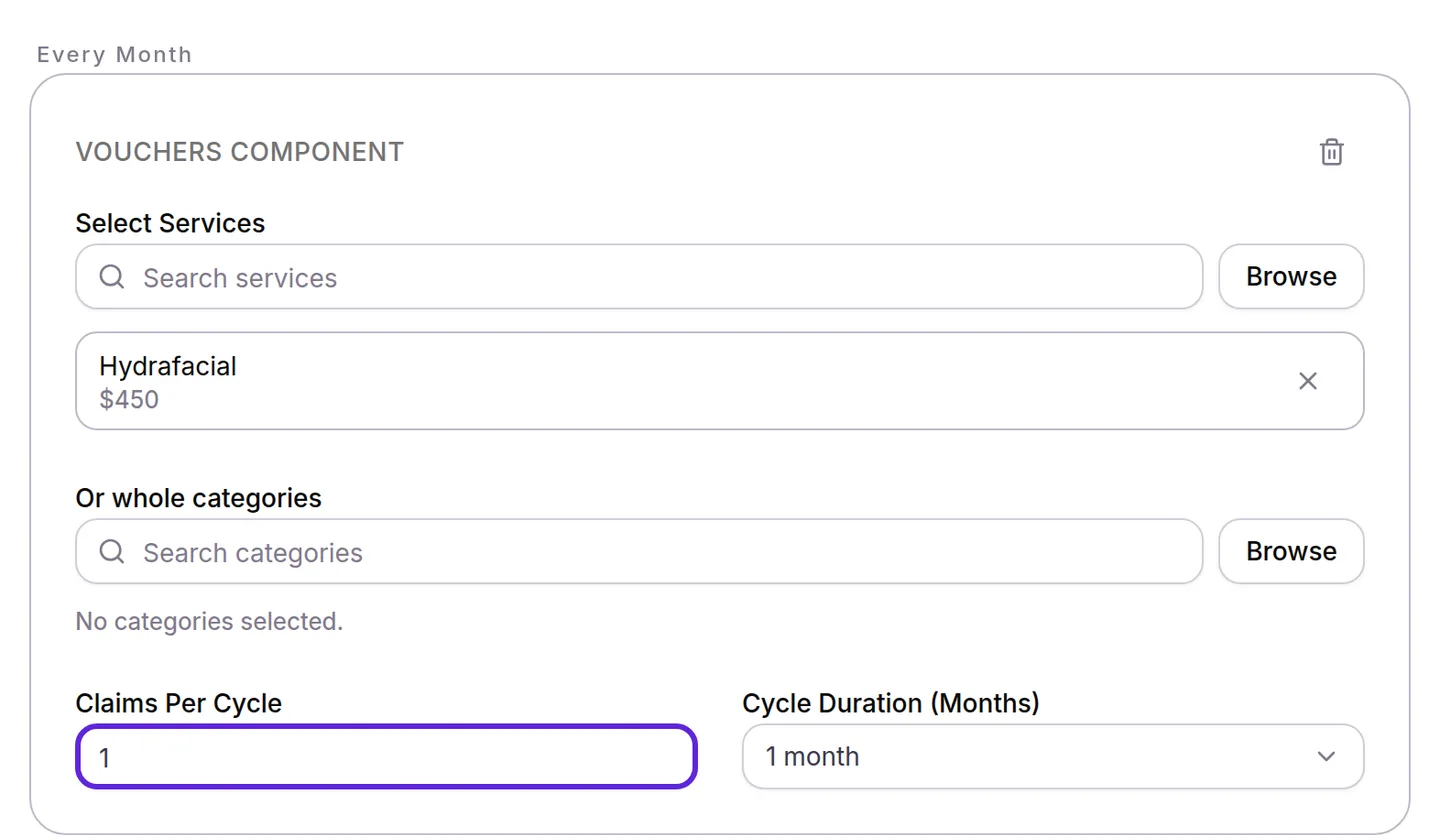
| A membership plan’s Vouchers Component with one treatment | Automatically at the start of each cycle, as many as the component’s Claims Per Cycle | Until the end of the billing period it arrived in |
| A Vouchers Component with several treatments or a whole category, called a choice voucher | When the member picks a treatment, or your team picks for them | Until the end of the billing period it was picked in |
| A Refer a Friend reward set to Free service | When the referral is rewarded | Until used |
| The Sign-Up Bonus set to Voucher | When the patient joins your practice in the app | Until used |
| The Birthday Gift set to Free service | On the patient’s birthday | Until used |
| A treatment bought in the app without booking a time | When the purchase is paid | Until used |
How do choice vouchers and the selection deadline work?
A choice voucher lets each member pick their treatment for the cycle from a list you set, up to the component’s Claims Per Cycle. Members pick on Claim your benefits in the app, and your team can pick for them with Pick on their profile. Each treatment on the list can be picked once per cycle.
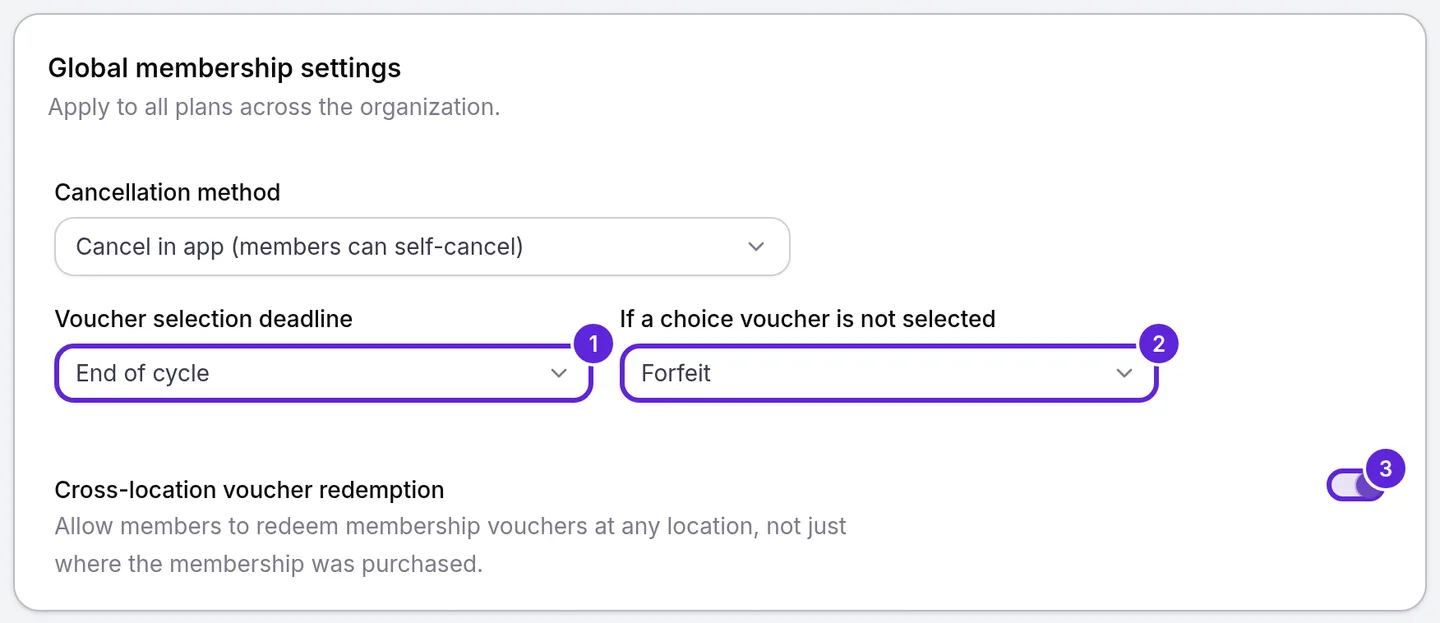
Picks close at the Voucher selection deadline: End of cycle, the default, or Custom day, which closes them the number of days you set in Deadline day (1-28) after the member’s cycle starts. Velarya reminds the member once when 7 days or less are left. At the deadline, If a choice voucher is not selected decides what happens to each choice still open:
| Setting | What the member gets for an open choice |
|---|---|
| Forfeit, the default | Nothing more this cycle |
| Auto-select first option | A voucher for the first treatment on the list they have not picked |
| Convert to credit | Wallet credit worth the cheapest treatment on the list |
Let members choose their included treatments walks through building a choice voucher and setting the deadline.
When do vouchers expire?
Membership vouchers in Velarya expire with the billing period they belong to: a patient can redeem one until the end of the day that period ends, in your practice’s time zone. Vouchers from a referral, the sign-up bonus, the birthday gift or an app purchase stay on the patient’s account until they use them.
- Velarya reminds the patient once, in the app and by push, email and text, when a membership voucher has 7 days or less left, while Appointment Reminders is on in Notification Templates.
- An expired voucher no longer appears at checkout, and the patient and your team see it as expired.
- Your team can give a member a later New Expiry Date from Override Expiry Date on their profile.
- Cancel Immediately ends a membership’s unused vouchers at once. Cancel at Period End leaves them until the billing period ends.
What does a voucher cover at checkout?
A voucher pays for one unit of the treatment it names, at that patient’s own price for it: their member price or birthday price when one applies, whichever is lower, and the regular price otherwise. Add-ons, extra units and other treatments on the sale are charged as usual.
Velarya applies vouchers before any discount code, so the code works on what the patient still pays, and a Custom Discount ($) and wallet credit follow. The unit a voucher pays for earns no points; everything else on the sale earns points once it is paid. The examples use a $380.00 chemical peel and a member whose plan takes 10% off every treatment.
| The visit | Before the voucher | The voucher pays | Left to pay |
|---|---|---|---|
| One peel, for a patient with no membership | $380.00 | $380.00 | $0.00 |
| One peel, for the member | $342.00 | $342.00 | $0.00 |
| One peel for the member during a 20% whole-shop birthday discount | $304.00, the birthday price | $304.00 | $0.00 |
| One peel with a $60.00 add-on, no membership | $440.00 | $380.00 | $60.00 |
| Two peels on one line, for the member | $684.00 | $342.00 | $342.00 |
| One peel and Laser Hair Removal at $300.00, for the member, with a 10% code that combines with member pricing | $612.00 | $342.00 | $243.00: the code takes $27.00 off the laser’s $270.00 member price |
A few more rules apply to every voucher:
- A voucher pays for the exact treatment it names, and each voucher covers one line of a sale.
- Checkout shows Voucher available on a matching treatment, followed by where the voucher came from, such as the patient’s membership plan. Apply voucher reprices the sale, and Remove voucher undoes it before payment.
- Velarya marks the voucher used when the sale is paid, however it is paid. Until then it stays on the patient’s account.
- When two front desks apply the same voucher at once, the first sale goes through and the second is refused.
Redeem a voucher at checkout covers the checkout panel and New Transaction step by step.
What do patients see?
Patients see their vouchers in the patient app, each with its treatment and, for a membership voucher, its expiry date.
- Home shows Your free vouchers are here! with Claim while a choice voucher is open. After claiming, the app says how many vouchers they claimed and the date to use them by, with Go to calendar.
- The Calendar tab lists each voucher under Unscheduled, marked Needs Scheduling. Schedule opens booking for that treatment, and the review shows it as Free, with nothing to pay. When online booking is off, vouchers are listed under Active on the Treatments tab.
- A redeemed voucher leaves the list after the visit is paid.
What you can change
Voucher settings in Velarya decide which vouchers patients receive and the rules each one follows.
| Setting | Where | Default | What it changes |
|---|---|---|---|
| Vouchers Component | A plan in Organization settings > Memberships | None | The treatments a plan includes, Claims Per Cycle and Cycle Duration (Months) |
| Voucher selection deadline | Global membership settings | End of cycle | When members’ picks close |
| If a choice voucher is not selected | Global membership settings | Forfeit | What an open choice becomes at the deadline |
| Cross-location voucher redemption | Global membership settings | On | Whether membership vouchers work at every location |
| Free service or Voucher as the reward | Refer a Friend on Challenges, and Birthday Gift and Sign-Up Bonus on Rewards Program | Another reward type | Whether a referral, a birthday or a sign-up gives a voucher, and for which treatment |
| Override Expiry Date | Membership perks on the patient’s profile | The billing period’s end | How long one member’s voucher lasts |
Where to find voucher settings
The voucher rules for every plan sit at the top of Organization settings > Memberships, in Global membership settings:
- Voucher selection deadline, with Deadline day (1-28) for Custom day.
- If a choice voucher is not selected.
- Cross-location voucher redemption, a switch that saves at once.
Your team sees every voucher a patient holds on their profile: open the patient in Clients and select Memberships & Wallet for each voucher’s treatment, where it came from and its expiry. Seeing vouchers takes Wallet, points & credits at View. For how a plan’s vouchers fit with its credit and member pricing, see How memberships work.
Frequently asked questions
Was this guide helpful?
Last verified
What changed
- : A referral voucher arrives when the referral is rewarded, which waits for your team's approval when you approve referrals by hand.