
Send intake and consent forms to patients
Updated Last verified against the product
In short
Velarya sends each patient a secure link to their intake and consent forms by email, and by text once they agree to texts, at booking or with their appointment reminders, as each form's delivery settings say. The patient fills and signs on their phone, and your team sees Awaiting client until they submit.
- Who can do this
- Delivery settings: Admins (Form & chart template builder at manage). Checking forms: Clinical charts & forms at view (Admins; Location Managers for patients seen at their locations; Service Providers for their own appointments). Sending a link again: Clinical charts & forms at edit (Admins, and Service Providers for their own appointments)
- Applies to
- Your whole practice, every location
- Plans
- Scale, Branded and Connected
- Time
- 5 minutes
Before you begin
- A published form template, such as New Client Intake or Photo Consent: Create a form or chart template.
Send forms automatically when patients book
Velarya sends a form to each patient whose booking matches the form template, at the moments you turn on under Delivery. It works whether your team books the visit on the Calendar, the patient books online or in your app, or a walk-in is promoted to a visit.
- Open Organization settings > Forms & Charts and select the form.
- Select the Settings tab.
- Under Delivery, turn on Send with confirmation to send the form as soon as the appointment is booked.
- Turn on Send with reminder to send it with every appointment reminder, and Send same day to send it with the appointment reminders that go out on the day of the visit, such as 2 Hours Before. Each switch sends on its own, in any combination. Both ride on your appointment reminders, so keep Appointment Reminders on.
- Check Services and Locations above. A form goes out only with bookings for the services and locations it applies to.
- Select Save draft. The delivery settings apply at once, to new bookings and to forms already sent and not yet filled. A form that is still a draft needs Publish as well.
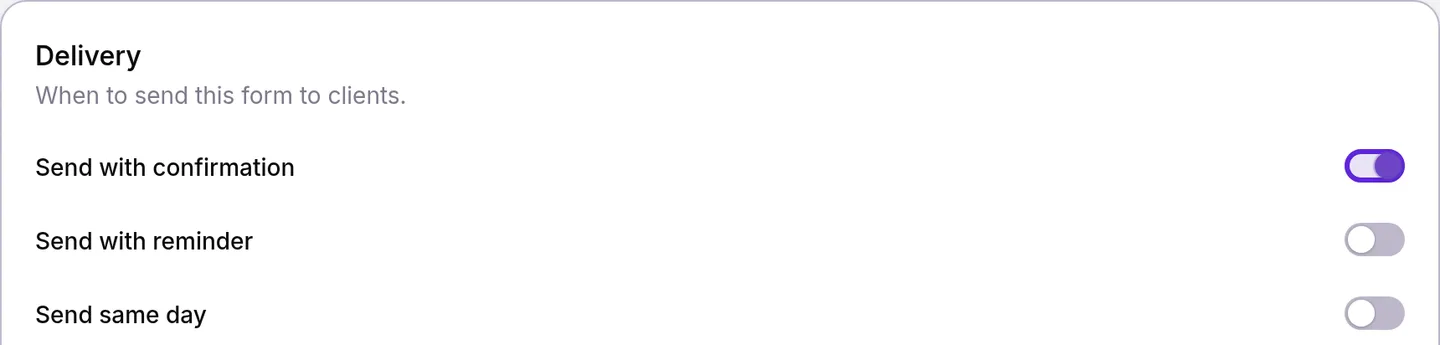
Appointment reminders are on for a new practice and go out at the times set in Set up appointment reminders: 24 and 2 hours before the visit by default. Each reminder carries the forms set to Send with reminder, and on the day of the visit those set to Send same day, that the patient has not submitted yet.
What do patients receive?
Each form has its own link, which opens that one form for that one patient, and goes out in its own email and text.
- By email, when the patient has an email address and email turned on: an email headed with your practice’s name, the subject “Forms to complete before your visit”, a greeting with their first name, a line saying your practice “has forms for you to complete before your visit.” and a Complete your forms link, signed by your practice’s team.
- By text, when the patient has agreed to texts: a short text with the link. Manage patients’ text consent and opt-outs covers turning texts on.
- With a reminder, the reminder email adds “Please complete your forms before your visit” with a Complete your forms link for each open form, and the reminder in your app’s Notifications list opens them too. A reminder never leaves a patient without a working link, whether they read email or texts.
A link works until 24 hours after the appointment starts, or for 14 days from when it was sent if that comes sooner. If the visit moves, the link moves with it. For visits booked more than two weeks ahead, turn on Send with reminder as well, so the patient gets a fresh link with each reminder.
How do patients fill a form?
The link opens a page with your practice’s logo and name, then “Hi” and the patient’s first name: “please complete this form. Your answers save automatically as you go.” Nothing else from their record shows. The patient answers each question, and a Signature field lets them Draw with a finger or Type their full name.
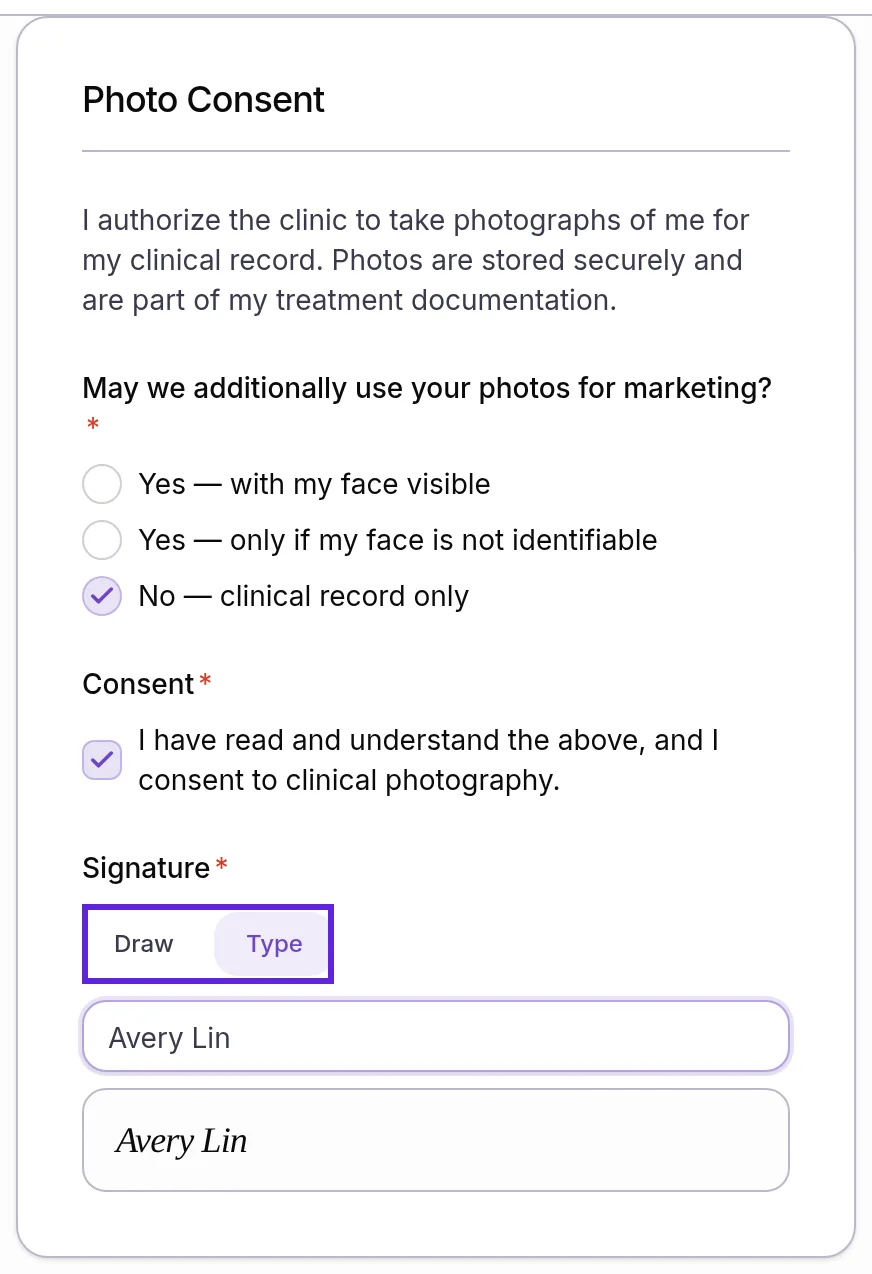
When they select Submit form, the page checks every required field, asks “Submit this form?” and, once they confirm, shows “We have received your form”. Answers in connected fields, such as allergies and medications, go straight into the patient’s medical record and replace what was on file for that field.
Check whether a patient has filled their forms
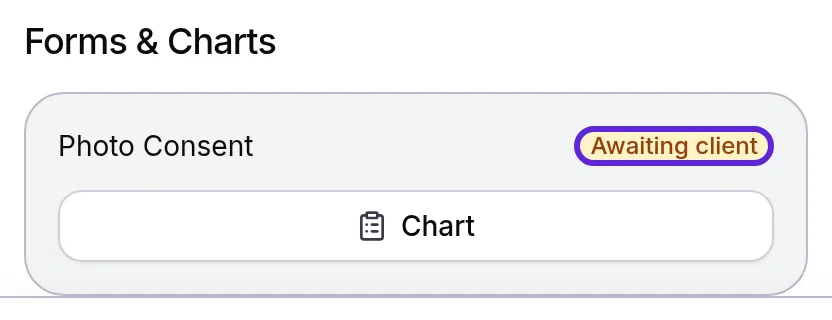
Every form sent for a visit shows its status to staff with Clinical charts & forms: Awaiting client until the patient submits, then Completed.
- On the Calendar or Front Desk, select the appointment to open its panel.
- Find the Forms & Charts block. It lists each form and chart for the visit with its status.
- To see every form a patient has ever filled, open their profile in Clients and select the Clinical tab. The Charts card lists them newest first, with “Client form” and the date under each.
- Select a completed form to read the patient’s answers and their signature.
Send a form link again
Send form link sends a fresh link to a form the patient has not submitted yet, for example when they lost the email or the link has expired.
- Open the patient’s profile and select the Clinical tab, or open the appointment on the Calendar and select Chart to reach the visit’s Clinical tab.
- In Charts, find the form marked Awaiting client.
- Select the paper plane button at the end of its row, Send form link. Velarya sends a new link by email and by text, whichever the patient has turned on, and confirms with “Form link sent via email and sms” or the channel it used.

The new link replaces the one sent before, so ask the patient to use the newest message.
How do form deliveries behave?
Velarya follows these rules for every form it sends:
| Situation | What Velarya does |
|---|---|
| A matching appointment is booked | A form set to Send with confirmation goes out at once, or once an online booking held for payment is paid. Forms set to go with reminders go out then |
| A booking holds several services | Each form goes out once for the visit, even when it applies to more than one of its services |
| The visit is rescheduled | Open form links move with it and work until 24 hours after the new start |
| The visit is cancelled | Its unsubmitted forms are withdrawn: the links stop working and the forms leave the patient’s Charts card |
| The form is set to One time | Each booking sends it until the patient submits it once. After that, bookings skip it until Expires after (months) has passed, if set |
| The form is set to Every appointment | Each booking gets its own copy, tied to that visit |
| The patient has no email and has not agreed to texts | The form waits as Awaiting client, and Send form link answers “No delivery channel available for this client” |
| The patient submits | The form shows Completed, the link stops working, and answers in connected fields update the medical record. A blank answer never erases one |
| The template is disabled after a form went out | The patient can still fill that form. New bookings no longer get it |
| Someone opens, saves, signs or submits a form | Velarya records it in the patient’s Access history and your Audit Log |
If something goes wrong
The patient sees “This link is no longer valid”. The link has expired, a newer link replaced it, or the form was already submitted. Check the form on the patient’s Charts card: select Send form link if it shows Awaiting client. If it shows Completed, the patient has nothing left to do.
“No delivery channel available for this client”. The patient has no email address with email turned on, and has not agreed to texts. Add their email with More actions > Edit client details, or turn on SMS Notifications once they agree to texts, then send the link again. A patient who replied STOP turns texts back on by replying START.
A patient got no form after booking. Check that the template is published, that Send with confirmation is on (forms set only to Send with reminder or Send same day go out with those reminders), and that its services and locations include the booking. If the form shows Awaiting client, select Send form link; the entry above covers a patient with no email or texts. A One time form skips patients who already submitted it and whose copy has not expired.
“1 required field is still empty”. The patient tried to submit before answering a required question. Every required field needs an answer, and a required signature needs a drawn or typed signature.
The Forms & Charts block or the Clinical tab is missing. Your role holds no Clinical charts & forms or Clinical details (sex at birth, meds, allergies) permission. The Front Desk role holds neither by default, as How patient privacy works shows.
Frequently asked questions
Was this guide helpful?
Last verified
What changed
- : Describes the form email as patients now see it: headed with your practice's name and signed by your practice's team. Its subject, wording and Complete your forms link are unchanged.