
How birthday gifts work
Updated Last verified against the product
In short
Velarya's birthday gift gives each eligible patient one gift a year on their birthday: a percentage off every treatment or one category for a set time, a free service or points. Each treatment gets the lower of its member and birthday price; a discount code adds on only when set to combine, and a Custom Discount ($) always applies.
- Who can do this
- Admins and roles with Rewards & loyalty program set to Edit change the gift; a code's Birthday discounts setting needs Discounts, offers & vouchers set to Edit
- Applies to
- Your whole practice, every location
- Plans
- Scale, Branded and Connected
- Time
- 5 minute read
What is the birthday gift?
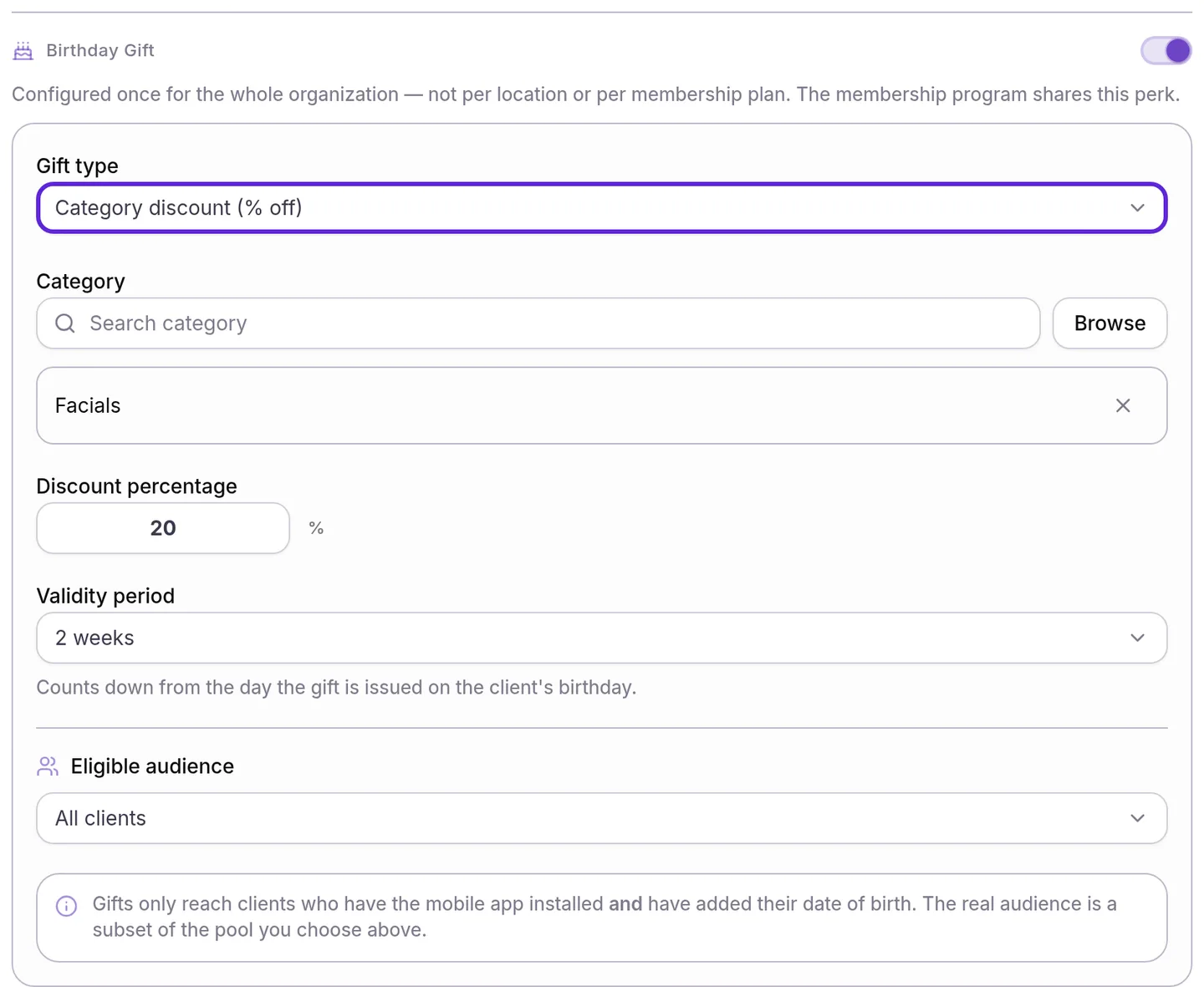
The birthday gift in Velarya is a reward that each eligible patient receives automatically on their birthday, once a year, from your whole practice. You choose one of four gifts on the Rewards Program page:
| Gift type | What the patient gets |
|---|---|
| Whole-shop discount (% off) | A percentage off every treatment they book or buy while the discount lasts |
| Category discount (% off) | The same percentage, on the treatments in one category you pick |
| Free service | A voucher for one treatment you pick, which they book whenever it suits them |
| Points | The number of points you set, added to their balance |
The two discount types are birthday discounts: for the Validity period you set, they change the price the patient pays. A free service and points arrive once and stay on the patient’s account until they use them.
When does a patient receive their birthday gift?
A patient receives the birthday gift on their birthday, in your practice’s time zone. Velarya checks for birthdays every 6 hours, so the gift and its message arrive early that day.
| Situation | What Velarya does |
|---|---|
| A patient visits several of your locations | Sends one gift per calendar year, which works at every location |
| The patient is in your Eligible audience, uses the patient app and has a date of birth on file | Sends the gift. Velarya checks the audience on the birthday itself |
| The patient was born on February 29 | Sends the gift on February 28 in years without a February 29 |
| The patient adds their date of birth after this year’s birthday | Sends the first gift on their next birthday |
| You change the gift partway through the year | Keeps every gift already issued as it was, with its percentage, category and end date. The next birthday gets the new gift |
| You turn the Birthday Gift switch off | Issues no new gifts. A birthday discount already issued lasts until its end date |
Which treatments does a birthday discount cover?
A birthday discount takes its percentage off the full price of each treatment it covers, options and add-ons included. A Whole-shop discount (% off) covers every treatment, and a Category discount (% off) covers the treatments in its Category. Velarya rounds each birthday price to the cent.
Velarya applies a birthday discount automatically, with nothing for the patient or your team to enter, wherever it prices a visit: the patient app, your online booking page, and your front desk in New Transaction and the checkout panel. A visit booked or a sale rung up while the discount is active gets the birthday price.
The discount lasts for the Validity period, counted from the birthday. Same day ends at 11:59 PM on the birthday, in your practice’s time zone, and a longer period ends at 11:59 PM on its last day. A birthday on October 3 with 2 weeks chosen runs until 11:59 PM on October 17.
How does the birthday gift combine with member pricing and codes?
The birthday gift follows the same pricing order as every Velarya sale, set out in How discounts combine:
- On each treatment, a member pays the lower of their member price and their birthday price, never both.
- A voucher pays for one unit of its treatment at that lower price.
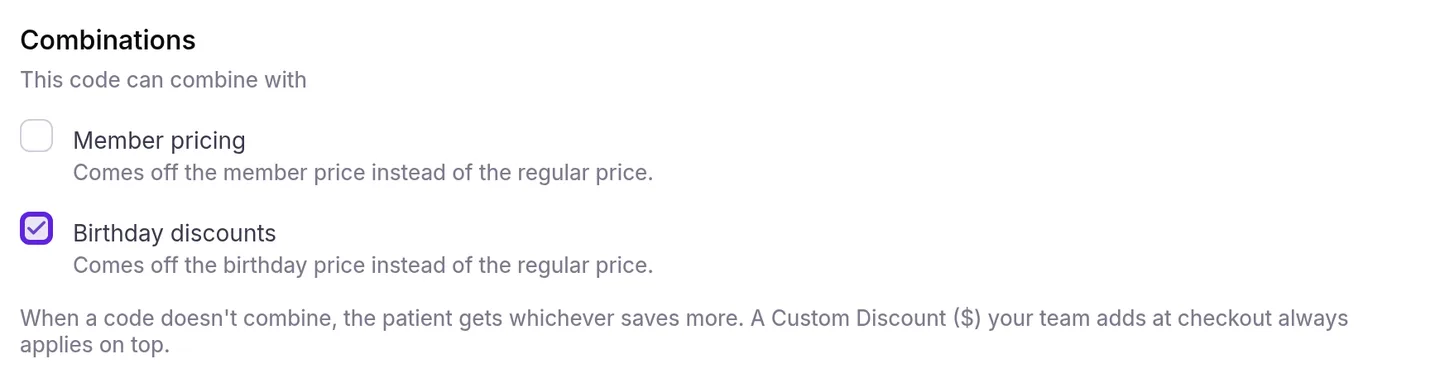
- A discount code comes off the birthday price only when it is set to combine with Birthday discounts. Any other code competes: Velarya applies whichever saves the patient more, and a code that saves no more is not used.
- A Custom Discount ($) your team enters at checkout always comes off on top.
- The patient earns points on what is left, and wallet credit pays toward it.
Here a member’s plan takes 10% off every treatment, and their birthday gift is a Category discount (% off) of 20% on Facials. They book a Hydrafacial at $450.00, which is in Facials, and Laser Hair Removal at $300.00, which is not.
| What applies to the visit | Hydrafacial | Laser Hair Removal | The patient pays |
|---|---|---|---|
| The birthday gift, for a patient with no membership | $360.00, the birthday price | $300.00 | $660.00 |
| Member pricing and the birthday gift | $360.00, the birthday price | $270.00, the member price | $630.00 |
| Both, with a 10% entire-visit code that combines with nothing | $360.00 | $270.00 | $630.00. The code would save $75.00, less than the $120.00 already saved, so it is not used |
| Both, with a 25% entire-visit code that combines with nothing | $337.50 | $225.00 | $562.50. The code saves $187.50 on the regular prices, more than the member and birthday prices do, so it replaces them |
| Both, with a 10% code that combines with member pricing and birthday discounts | $324.00 | $243.00 | $567.00, which is 10% off $630.00 |
A Custom Discount ($) comes off after all of these: $25.00 at checkout takes the member’s $630.00 visit to $605.00. Staff see each saving on its own row before they take payment, including a Birthday gift row, and each treatment shows the patient’s price with the regular price struck through.
What do patients see?
Patients learn about their birthday gift from a notification titled Happy birthday! 🎂 in the patient app, such as “[Your practice] gave you 20% off as a birthday gift. 🎂”. A push notification titled You have a gift also arrives when they allow notifications, with no details on the lock screen.
| The gift | Where the patient sees it |
|---|---|
| A birthday discount | In the app’s Shop, a treatment whose birthday price is the patient’s best price shows it next to the regular price, struck through, with a Birthday gift label and the percentage. At booking review the treatment reads Birthday price, and a 🎂 Birthday Gift row shows the saving. Your online booking page shows a 🎂 Birthday gift row |
| A birthday discount and a code that saves no more | Not used under the code, with “Your birthday discount saves as much or more, so this code wasn’t used” |
| A free service | A voucher for the treatment, marked Needs Scheduling, with a Schedule button that opens booking |
| Points | The points on their balance, ready to redeem as wallet credit |
How a free-service voucher is booked and redeemed is covered in How vouchers work.
What you can change
The Birthday Gift settings apply to your whole practice, and a change reaches the gifts issued from the next birthday on.
| Setting | Default | What it changes |
|---|---|---|
| Birthday Gift switch | Off | Whether Velarya sends birthday gifts |
| Gift type | Whole-shop discount (% off) | Which of the four gifts patients receive |
| Discount percentage | Empty, takes 1 to 100 | The size of a birthday discount |
| Category | None chosen | The category a Category discount (% off) covers |
| Validity period | Same day | How long a birthday discount lasts: Same day, 3 days, 1 week, 2 weeks, 1 month, or Custom from 1 to 365 days |
| Service | None chosen | The treatment a Free service gift pays for |
| Points amount | Empty | The points a Points gift adds |
| Eligible audience | All clients | Who qualifies: All clients, Members only, Visited in the last N months or Spent above a threshold |
| Birthday discounts, under a code’s Combinations | Clear | Whether that code comes off the birthday price or competes with it |
Where to find the birthday gift
The Birthday Gift settings sit on the Rewards Program page, and each discount code carries its own birthday rule.
- Open the menu at the bottom of the left sidebar and select Organization settings.
- Under Client Experience, select Rewards Program and scroll to Birthday Gift.
- To let a code come off the birthday price, open the code on Discounts & Offers and tick Birthday discounts under Combinations.
To turn the gift on and choose who receives it, step by step, follow Set up a birthday gift.
Frequently asked questions
Was this guide helpful?
Last verified